## Summary

This PR fixes the bug where the server was not considering the
`cells.structure.didOpen` field to sync up the new content of the newly
added cells.

The parameters corresponding to this request provides two fields to get
the newly added cells:
1. `cells.structure.array.cells`: This is a list of `NotebookCell` which
doesn't contain any cell content. The only useful information from this
array is the cell kind and the cell document URI which we use to
initialize the new cell in the index.
2. `cells.structure.didOpen`: This is a list of `TextDocumentItem` which
corresponds to the newly added cells. This actually contains the text
content and the version.

This wasn't a problem before because we initialize the cell with an
empty string and this isn't a problem when someone just creates an empty
cell. But, when someone copy-pastes a cell, the cell needs to be
initialized with the content.

fixes: #12201

## Test Plan

First, let's see the panic in action:

1. Press <kbd>Esc</kbd> to allow using the keyboard to perform cell
actions (move around, copy, paste, etc.)
2. Copy the second cell with <kbd>c</kbd> key
3. Delete the second cell with <kbd>dd</kbd> key
4. Paste the copied cell with <kbd>p</kbd> key

You can see that the content isn't synced up because the `unused-import`
for `sys` is still being highlighted but it's being used in the second
cell. And, the hover isn't working either. Then, as I start editing the
second cell, it panics.


https://github.com/astral-sh/ruff/assets/67177269/fc58364c-c8fc-4c11-a917-71b6dd90c1ef

Now, here's the preview of the fixed version:


https://github.com/astral-sh/ruff/assets/67177269/207872dd-dca6-49ee-8b6e-80435c7ef22e
## Summary
Fixes#11651.
Fixes#11851.
We were double-closing a notebook document from the index, once in
`textDocument/didClose` and then in the `notebookDocument/didClose`
handler. The second time this happens, taking a snapshot fails.
I've rewritten how we handle snapshots for closing notebooks / notebook
cells so that any failure is simply logged instead of propagating
upwards. This implementation works consistently even if we don't receive
`textDocument/didClose` notifications for each specific cell, since they
get closed (and the diagnostics get cleared) in the notebook document
removal process.
## Test Plan
1. Open an untitled, unsaved notebook with the `Create: New Jupyter
Notebook` command from the VS Code command palette (`Ctrl/Cmd + Shift +
P`)
2. Without saving the document, close it.
3. No error popup should appear.
4. Run the debug command (`Ruff: print debug information`) to confirm
that there are no open documents
## Summary
Closes#11914.
This PR introduces a snapshot test that replays the LSP requests made
during a document formatting request, and confirms that the notebook
document is updated in the expected way.
## Summary
Fixes#11911.
`shellexpand` is now used on `logFile` to expand the file path, allowing
the usage of `~` and environment variables.
## Test Plan
1. Set `logFile` in either Neovim or Helix to a file path that needs
expansion, like `~/.config/helix/ruff_logs.txt`.
2. Ensure that `RUFF_TRACE` is set to `messages` or `verbose`
3. Open a Python file in Neovim/Helix
4. Confirm that a file at the path specified was created, with the
expected logs.
## Summary

Fixes https://github.com/astral-sh/ruff-vscode/issues/496.

Cells are no longer removed from the notebook index when a notebook gets
updated, but rather when `textDocument/didClose` is called for them.
This solves an issue where their premature removal from the notebook
cell index would cause their URL to be un-queryable in the
`textDocument/didClose` handler.

## Test Plan

Create and then delete a notebook cell in VS Code. No error should
appear.
## Summary
Closes#11715.
Introduces a new command, `ruff.printDebugInformation`. This will print
useful information about the status of the server to `stderr`.
Right now, the information shown by this command includes:
* The path to the server executable
* The version of the executable
* The text encoding being used
* The number of open documents and workspaces
* A list of registered configuration files
* The capabilities of the client
## Test Plan
First, checkout and use [the corresponding `ruff-vscode`
PR](https://github.com/astral-sh/ruff-vscode/pull/495).
Running the `Print debug information` command in VS Code should show
something like the following in the Output channel:
<img width="991" alt="Screenshot 2024-06-11 at 11 41 46 AM"
src="https://github.com/astral-sh/ruff/assets/19577865/ab93c009-bb7b-4291-b057-d44fdc6f9f86">
## Summary
Fixes#10968.
Fixes#11545.
The server's tracing system has been rewritten from the ground up. The
server now has trace level and log level settings which restrict the
tracing events and spans that get logged.
* A `logLevel` setting has been added, which lets a user set the log
level. By default, it is set to `"info"`.
* A `logFile` setting has also been added, which lets the user supply an
optional file to send tracing output (it does not have to exist as a
file yet). By default, if this is unset, tracing output will be sent to
`stderr`.
* A `$/setTrace` handler has also been added, and we also set the trace
level from the initialization options. For editors without direct
support for tracing, the environment variable `RUFF_TRACE` can override
the trace level.
* Small changes have been made to how we display tracing output. We no
longer use `tracing-tree`, and instead use
`tracing_subscriber::fmt::Layer` to format output. Thread names are now
included in traces, and I've made some adjustment to thread worker names
to be more useful.
## Test Plan
In VS Code, with `ruff.trace.server` set to its default value, no logs
from Ruff should appear.
After changing `ruff.trace.server` to either `messages` or `verbose`,
you should see log messages at `info` level or higher appear in Ruff's
output:
<img width="1005" alt="Screenshot 2024-06-10 at 10 35 04 AM"
src="https://github.com/astral-sh/ruff/assets/19577865/6050d107-9815-4bd2-96d0-e86f096a57f5">
In Helix, by default, no logs from Ruff should appear.
To set the trace level in Helix, you'll need to modify your language
configuration as follows:
```toml
[language-server.ruff]
command = "/Users/jane/astral/ruff/target/debug/ruff"
args = ["server", "--preview"]
environment = { "RUFF_TRACE" = "messages" }
```
After doing this, logs of `info` level or higher should be visible in
Helix:
<img width="1216" alt="Screenshot 2024-06-10 at 10 39 26 AM"
src="https://github.com/astral-sh/ruff/assets/19577865/8ff88692-d3f7-4fd1-941e-86fb338fcdcc">
You can use `:log-open` to quickly open the Helix log file.
In Neovim, by default, no logs from Ruff should appear.
To set the trace level in Neovim, you'll need to modify your
configuration as follows:
```lua
require('lspconfig').ruff.setup {
cmd = {"/path/to/debug/executable", "server", "--preview"},
cmd_env = { RUFF_TRACE = "messages" }
}
```
You should see logs appear in `:LspLog` that look like the following:
<img width="1490" alt="Screenshot 2024-06-11 at 11 24 01 AM"
src="https://github.com/astral-sh/ruff/assets/19577865/576cd5fa-03cf-477a-b879-b29a9a1200ff">
You can adjust `logLevel` and `logFile` in `settings`:
```lua
require('lspconfig').ruff.setup {
cmd = {"/path/to/debug/executable", "server", "--preview"},
cmd_env = { RUFF_TRACE = "messages" },
settings = {
logLevel = "debug",
logFile = "your/log/file/path/log.txt"
}
}
```
The `logLevel` and `logFile` can also be set in Helix like so:
```toml
[language-server.ruff.config.settings]
logLevel = "debug"
logFile = "your/log/file/path/log.txt"
```
Even if this log file does not exist, it should now be created and
written to after running the server:
<img width="1148" alt="Screenshot 2024-06-10 at 10 43 44 AM"
src="https://github.com/astral-sh/ruff/assets/19577865/ab533cf7-d5ac-4178-97f1-e56da17450dd">
## Summary

As-is, we're using the URL path for all files, leading us to use paths
like:

```
/c%3A/Users/crmar/workspace/fastapi/tests/main.py
```

This doesn't match against per-file ignores and other patterns in Ruff
configuration.

This PR modifies the LSP to use the real file path if available, and the
virtual file path if not.

Closes https://github.com/astral-sh/ruff/issues/11751.

## Test Plan

Ran the LSP on Windows. In the FastAPI repo, added:

```toml
[tool.ruff.lint.per-file-ignores]
"tests/**/*.py" = ["F401"]
```

And verified that an unused import was ignored in `tests` after this
change, but not before.
## Summary

Closes https://github.com/astral-sh/ruff/issues/11587.

## Test Plan

- Added a lint error to `test_server.py` in `vscode-ruff`.
- Validated that, prior to this change, diagnostics appeared in the
file.
- Validated that, with this change, no diagnostics were shown.
- Validated that, with this change, no diagnostics were fixed on-save.
## Summary

This PR fixes the bug to avoid flattening the global-only settings for
the new server.

This was added in https://github.com/astral-sh/ruff/pull/11497, possibly
to correctly de-serialize an empty value (`{}`). But, this lead to a bug
where the configuration under the `settings` key was not being read for
global-only variant.

By using #[serde(default)], we ensure that the settings field in the
`GlobalOnly` variant is optional and that an empty JSON object `{}` is
correctly deserialized into `GlobalOnly` with a default `ClientSettings`
instance.

fixes: #11507

## Test Plan

Update the snapshot and existing test case. Also, verify the following
settings in Neovim:

1. Nothing

```lua
ruff = {
  cmd = {
    '/Users/dhruv/work/astral/ruff/target/debug/ruff',
    'server',
    '--preview',
  },
}
```

2. Empty dictionary

```lua
ruff = {
  cmd = {
    '/Users/dhruv/work/astral/ruff/target/debug/ruff',
    'server',
    '--preview',
  },
  init_options = vim.empty_dict(),
}
```

3. Empty `settings`

```lua
ruff = {
  cmd = {
    '/Users/dhruv/work/astral/ruff/target/debug/ruff',
    'server',
    '--preview',
  },
  init_options = {
    settings = vim.empty_dict(),
  },
}
```

4. With some configuration:

```lua
ruff = {
  cmd = {
    '/Users/dhruv/work/astral/ruff/target/debug/ruff',
    'server',
    '--preview',
  },
  init_options = {
    settings = {
      configuration = '/tmp/ruff-repro/pyproject.toml',
    },
  },
}
```
## Summary
Fixes#11506.
`RuffSettingsIndex::new` now searches for configuration files in parent
directories.
## Test Plan
I confirmed that the original test case described in the issue worked as
expected.
## Summary
Fixes#11534.
`DocumentQuery::source_type` now returns `PySourceType::Stub` when the
document is a `.pyi` file.
## Test Plan
I confirmed that stub-specific rule violations appeared with a build
from this PR (they were not visible from a `main` build).
<img width="1066" alt="Screenshot 2024-05-24 at 2 15 38 PM"
src="https://github.com/astral-sh/ruff/assets/19577865/cd519b7e-21e4-41c8-bc30-43eb6d4d438e">
## Summary

Fixes https://github.com/astral-sh/ruff/issues/11236.

This PR fixes several issues, most of which relate to non-VS Code
editors (Helix and Neovim).

1. Global-only initialization options are now correctly deserialized
from Neovim and Helix
2. Empty diagnostics are now published correctly for Neovim and Helix.
3. A workspace folder is created at the current working directory if the
initialization parameters send an empty list of workspace folders.
4. The server now gracefully handles opening files outside of any known
workspace, and will use global fallback settings taken from client
editor settings and a user settings TOML, if it exists.

## Test Plan

I've tested to confirm that each issue has been fixed.

* Global-only initialization options are now correctly deserialized from
Neovim and Helix + the server gracefully handles opening files outside
of any known workspace


https://github.com/astral-sh/ruff/assets/19577865/4f33477f-20c8-4e50-8214-6608b1a1ea6b

* Empty diagnostics are now published correctly for Neovim and Helix


https://github.com/astral-sh/ruff/assets/19577865/c93f56a0-f75d-466f-9f40-d77f99cf0637

* A workspace folder is created at the current working directory if the
initialization parameters send an empty list of workspace folders.


https://github.com/astral-sh/ruff/assets/19577865/b4b2e818-4b0d-40ce-961d-5831478cc726
## Summary

Recent changes made in the [Jupyter Notebook feature
PR](https://github.com/astral-sh/ruff/pull/11206) caused automatic
configuration reloading to stop working. This was because we would check
for paths to reload using the changed path, when we should have been
using the parent path of the changed path (to get the directory it was
changed in).

Additionally, this PR fixes an issue where `ruff.toml` and `.ruff.toml`
files were not being automatically reloaded.

Finally, this PR improves configuration reloading by actively publishing
diagnostics for notebook documents (which won't be affected by the
workspace refresh since they don't use pull diagnostics). It will also
publish diagnostics for text documents if pull diagnostics aren't
supported.

## Test Plan
To test this, open an existing configuration file in a codebase, and
make modifications that will affect one or more open Python / Jupyter
Notebook files. You should observe that the diagnostics for both kinds
of files update automatically when the file changes are saved.

Here's a test video showing what a successful test should look like:


https://github.com/astral-sh/ruff/assets/19577865/7172b598-d6de-4965-b33c-6cb8b911ef6c
## Summary
Closes https://github.com/astral-sh/ruff/issues/10858.
`ruff server` now supports `*.ipynb` (aka Jupyter Notebook) files.
Extensive internal changes have been made to facilitate this, which I've
done some work to contextualize with documentation and an pre-review
that highlights notable sections of the code.
`*.ipynb` cells should behave similarly to `*.py` documents, with one
major exception. The format command `ruff.applyFormat` will only apply
to the currently selected notebook cell - if you want to format an
entire notebook document, use `Format Notebook` from the VS Code context
menu.
## Test Plan
The VS Code extension does not yet have Jupyter Notebook support
enabled, so you'll first need to enable it manually. To do this,
checkout the `pre-release` branch and modify `src/common/server.ts` as
follows:
Before:

After:

I recommend testing this PR with large, complicated notebook files. I
used notebook files from [this popular
repository](https://github.com/jakevdp/PythonDataScienceHandbook/tree/master/notebooks)
in my preliminary testing.
The main thing to test is ensuring that notebook cells behave the same
as Python documents, besides the aforementioned issue with
`ruff.applyFormat`. You should also test adding and deleting cells (in
particular, deleting all the code cells and ensure that doesn't break
anything), changing the kind of a cell (i.e. from markup -> code or vice
versa), and creating a new notebook file from scratch. Finally, you
should also test that source actions work as expected (and across the
entire notebook).
Note: `ruff.applyAutofix` and `ruff.applyOrganizeImports` are currently
broken for notebook files, and I suspect it has something to do with
https://github.com/astral-sh/ruff/issues/11248. Once this is fixed, I
will update the test plan accordingly.
---------
Co-authored-by: nolan <nolan.king90@gmail.com>
## Summary

Fixes https://github.com/astral-sh/ruff/issues/10594.

Code actions to disable a diagnostic via `noqa` comment are now
available.


https://github.com/astral-sh/ruff/assets/19577865/6d3bcf11-a9d9-499b-8c7f-a10cd39cfbba

`DiagnosticFix` has been changed so that `noqa` code actions appear even
for diagnostics with no available quick fix. It can contain quick fix
edits, `noqa` comment edits, or both.

## Test Plan

The scenarios that need to be tested are as follows:
* A code action to disable a diagnostic should be available for every
diagnostic.
* Using this code action should append to the appropriate line with the
diagnostic, or modify an existing `noqa` comment.
* Adding a `noqa` comment manually should make a diagnostic disappear
* `Fix all auto-fixable problems` should not add `noqa` comments
* Removing a code from a `noqa` comment should make the diagnostic
re-appear
## Summary

Fixes https://github.com/astral-sh/ruff/issues/11258.

This PR fixes the settings resolver to match the expected behavior when
file-based configuration is not available.

## Test Plan

In a workspace with no file-based configuration, set a setting in your
editor and confirm that this setting is used instead of the default.
## Summary
Users can now include tildes and environment variables in the provided
path, just like with `--config`.
Closes#11277.
## Test Plan
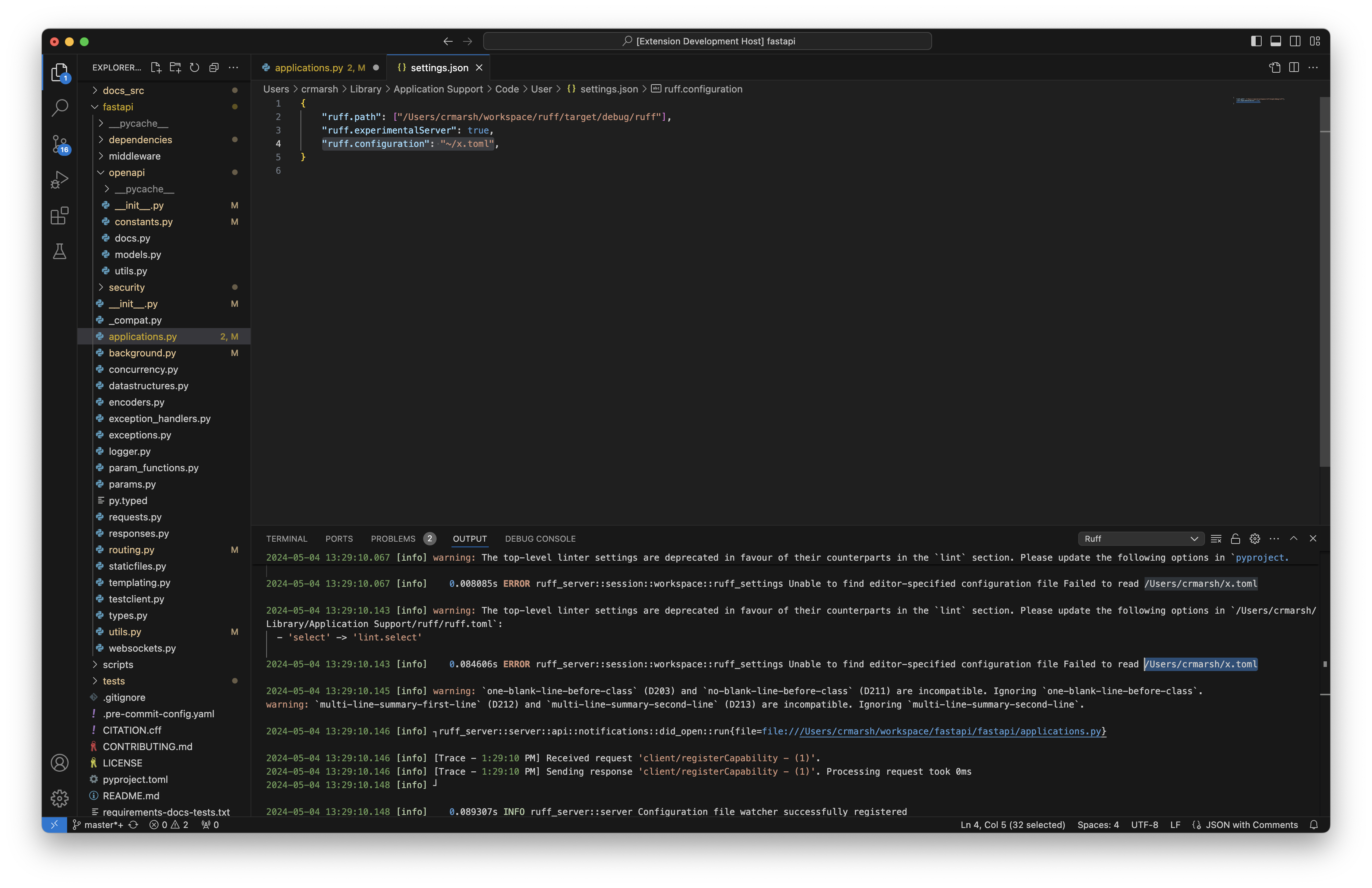
Set the configuration path to `"ruff.configuration": "~/x.toml"`;
verified that the server attempted to read from `/Users/crmarsh/x.toml`.
## Summary

Fixes https://github.com/astral-sh/ruff/issues/11158.

A settings file in the ruff user configuration directory will be used as
a configuration fallback, if it exists.

## Test Plan

Create a `pyproject.toml` or `ruff.toml` configuration file in the ruff
user configuration directory.

* On Linux, that will be `$XDG_CONFIG_HOME/ruff/` or `$HOME/.config`
* On macOS, that will be `$HOME/Library/Application Support`
* On Windows, that will be `{FOLDERID_LocalAppData}`

Then, open a file inside of a workspace with no configuration. The
settings in the user configuration file should be used.
## Summary
Closes#10985.
The server now supports a custom TOML configuration file as a client
setting. The setting must be an absolute path to a file. If the file is
called `pyproject.toml`, the server will attempt to parse it as a
pyproject file - otherwise, it will attempt to parse it as a `ruff.toml`
file, even if the file has a name besides `ruff.toml`.
If an option is set in both the custom TOML configuration file and in
the client settings directly, the latter will be used.
## Test Plan
1. Create a `ruff.toml` file outside of the workspace you are testing.
Set an option that is different from the one in the configuration for
your test workspace.
2. Set the path to the configuration in NeoVim:
```lua
require('lspconfig').ruff.setup {
init_options = {
settings = {
configuration = "absolute/path/to/your/configuration"
}
}
}
```
3. Confirm that the option in the configuration file is used, regardless
of what the option is set to in the workspace configuration.
4. Add the same option, with a different value, to the NeoVim
configuration directly. For example:
```lua
require('lspconfig').ruff.setup {
init_options = {
settings = {
configuration = "absolute/path/to/your/configuration",
lint = {
select = []
}
}
}
}
```
5. Confirm that the option set in client settings is used, regardless of
the value in either the custom configuration file or in the workspace
configuration.
## Summary

This is intended to address
https://github.com/astral-sh/ruff-vscode/issues/425, and is a follow-up
to https://github.com/astral-sh/ruff/pull/11062.

A new client setting is now supported by the server,
`prioritizeFileConfiguration`. This is a boolean setting (default:
`false`) that, if set to `true`, will instruct the configuration
resolver to prioritize file configuration (aka discovered TOML files)
over configuration passed in by the editor.

A corresponding extension PR has been opened, which makes this setting
available for VS Code:
https://github.com/astral-sh/ruff-vscode/pull/457.

## Test Plan

To test this with VS Code, you'll need to check out [the VS Code
PR](https://github.com/astral-sh/ruff-vscode/pull/457) that adds this
setting.

The test process is similar to
https://github.com/astral-sh/ruff/pull/11062, but in scenarios where the
editor configuration would take priority over file configuration, file
configuration should take priority.
## Summary

This is a follow-up to https://github.com/astral-sh/ruff/pull/10984 that
implements configuration resolution for editor configuration. By 'editor
configuration', I'm referring to the client settings that correspond to
Ruff configuration/options, like `preview`, `select`, and so on. These
will be combined with 'project configuration' (configuration taken from
project files such as `pyproject.toml`) to generate the final linter and
formatter settings used by `RuffSettings`. Editor configuration takes
priority over project configuration.

In a follow-up pull request, I'll implement a new client setting that
allows project configuration to override editor configuration, as per
[this issue](https://github.com/astral-sh/ruff-vscode/issues/425).

## Review guide

The first commit, e38966d8843becc7234fa7d46009c16af4ba41e9, is just
doing re-arrangement so that we can pass the right things to
`RuffSettings::resolve`. The actual resolution logic is in the second
commit, 0eec9ee75c10e5ec423bd9f5ce1764f4d7a5ad86. It might help to look
at these comments individually since the diff is rather messy.

## Test Plan

For the settings to show up in VS Code, you'll need to checkout this
branch: https://github.com/astral-sh/ruff-vscode/pull/456.

To test that the resolution for a specific setting works as expected,
run through the following scenarios, setting it in project and editor
configuration as needed:

| Set in project configuration? | Set in editor configuration? |
Expected Outcome |

|-------------------------------|--------------------------------------------------|------------------------------------------------------------------------------------------|
| No | No | The editor should behave as if the setting was set to its
default value. |
| Yes | No | The editor should behave as if the setting was set to the
value in project configuration. |
| No | Yes | The editor should behave as if the setting was set to the
value in editor configuration. |
| Yes | Yes (but distinctive from project configuration) | The editor
should behave as if the setting was set to the value in editor
configuration. |

An exception to this is `extendSelect`, which does not have an analog in
TOML configuration. Instead, you should verify that `extendSelect`
amends the `select` setting. If `select` is set in both editor and
project configuration, `extendSelect` will only append to the `select`
value in editor configuration, so make sure to un-set it there if you're
testing `extendSelect` with `select` in project configuration.
## Summary
Fixes#11059
Several major editors don't support [pull
diagnostics](https://microsoft.github.io/language-server-protocol/specifications/lsp/3.17/specification/#textDocument_pullDiagnostics),
a method of sending diagnostics to the client that was introduced in
version `0.3.17` of the specification. Until now, `ruff server` has only
used pull diagnostics, which resulted in diagnostics not being available
on Neovim and Helix, which don't support pull diagnostics yet (though
Neovim `10.0` will have support for this).
`ruff server` will now utilize the older method of sending diagnostics,
known as 'publish diagnostics', when pull diagnostics aren't supported
by the client. This involves re-linting a document every time it is
opened or modified, and then sending the diagnostics generated from that
lint to the client via the `textDocument/publishDiagnostics`
notification.
## Test Plan
The easiest way to test that this PR works is to check if diagnostics
show up on Neovim `<=0.9`.
## Summary

The following client settings have been introduced to the language
server:
* `lint.preview`
* `format.preview`
* `lint.select`
* `lint.extendSelect`
* `lint.ignore`
* `exclude`
* `lineLength`

`exclude` and `lineLength` apply to both the linter and formatter.

This does not actually use the settings yet, but makes them available
for future use.

## Test Plan

Snapshot tests have been updated.
## Summary

The server now requests a [workspace diagnostic
refresh](https://microsoft.github.io/language-server-protocol/specifications/lsp/3.17/specification/#diagnostic_refresh)
when a configuration file gets changed. This means that diagnostics for
all open files will be automatically re-requested by the client on a
config change.

## Test Plan

You can test this by opening several files in VS Code, setting `select`
in your file configuration to `[]`, and observing that the diagnostics
go away once the file is saved (besides any `Pylance` diagnostics).
Restore it to what it was before, and you should see the diagnostics
automatically return once a save happens.
## Summary
Fixes#10866.
Introduces the `show_err_msg!` macro which will send a message to be
shown as a popup to the client via the `window/showMessage` LSP method.
## Test Plan
Insert various `show_err_msg!` calls in common code paths (for example,
at the beginning of `event_loop`) and confirm that these messages appear
in your editor.
To test that panicking works correctly, add this to the top of the `fn
run` definition in
`crates/ruff_server/src/server/api/requests/execute_command.rs`:
```rust
panic!("This should appear");
```
Then, try running a command like `Ruff: Format document` from the
command palette (`Ctrl/Cmd+Shift+P`). You should see the following
messages appear:

## Summary

Configuration is no longer the property of a workspace but rather of
individual documents. Just like the Ruff CLI, each document is
configured based on the 'nearest' project configuration. See [the Ruff
documentation](https://docs.astral.sh/ruff/configuration/#config-file-discovery)
for more details.

To reduce the amount of times we resolve configuration for a file, we
have an index for each workspace that stores a reference-counted pointer
to a configuration for a given folder. If another file in the same
folder is opened, the configuration is simply re-used rather than us
re-resolving it.

## Guide for reviewing

The first commit is just the restructuring work, which adds some noise
to the diff. If you want to quickly understand what's actually changed,
I recommend looking at the two commits that come after it.
f7c073d441 makes configuration a property
of `DocumentController`/`DocumentRef`, moving it out of `Workspace`, and
it also sets up the `ConfigurationIndex`, though it doesn't implement
its key function, `get_or_insert`. In the commit after it,
fc35618f17, we implement `get_or_insert`.

## Test Plan

The best way to test this would be to ensure that the behavior matches
the Ruff CLI. Open a project with multiple configuration files (or add
them yourself), and then introduce problems in certain files that won't
show due to their configuration. Add those same problems to a section of
the project where those rules are run. Confirm that the lint rules are
run as expected with `ruff check`. Then, open your editor and confirm
that the diagnostics shown match the CLI output.

As an example - I have a workspace with two separate folders, `pandas`
and `scipy`. I created a `pyproject.toml` file in `pandas/pandas/io` and
a `ruff.toml` file in `pandas/pandas/api`. I changed the `select` and
`preview` settings in the sub-folder configuration files and confirmed
that these were reflected in the diagnostics. I also confirmed that this
did not change the diagnostics for the `scipy` folder whatsoever.
## Summary

This is a follow-up to https://github.com/astral-sh/ruff/pull/10764.
Support for diagnostics, quick fixes, and source actions can now be
disabled via client settings.

## Test Plan

### Manual Testing

Set up your workspace as described in the test plan in
https://github.com/astral-sh/ruff/pull/10764, up to step 2. You don't
need to add a debug statement.
The configuration for `folder_a` and `folder_b` should be as follows:
`folder_a`:
```json
{
    "ruff.codeAction.fixViolation": {
        "enable": true
    }
}
```

`folder_b`
```json
{
    "ruff.codeAction.fixViolation": {
        "enable": false
    }
}
```
Finally, open up your VS Code User Settings and un-check the `Ruff > Fix
All` setting.

1. Open a Python file in `folder_a` that has existing problems. The
problems should be highlighted, and quick fix should be available.
`source.fixAll` should not be available as a source action.
2. Open a Python file in `folder_b` that has existing problems. The
problems should be highlighted, but quick fixes should not be available
for any of them. `source.fixAll` should not be available as a source
action.
3. Open up your VS Code Workspace Settings (second tab under the search
bar) and un-check `Ruff > Lint: Enable`
4. Both files you tested in steps 1 and 2 should now lack any visible
diagnostics. `source.organizeImports` should still be available as a
source action.
## Summary

This builds off of the work in
https://github.com/astral-sh/ruff/pull/10652 to implement a command
executor, backwards compatible with the commands from the previous LSP
(`ruff.applyAutofix`, `ruff.applyFormat` and
`ruff.applyOrganizeImports`).

This involved a lot of refactoring and tweaks to the code action
resolution code - the most notable change is that workspace edits are
specified in a slightly different way, using the more general `changes`
field instead of the `document_changes` field (which isn't supported on
all LSP clients). Additionally, the API for synchronous request handlers
has been updated to include access to the `Requester`, which we use to
send a `workspace/applyEdit` request to the client.

## Test Plan


https://github.com/astral-sh/ruff/assets/19577865/7932e30f-d944-4e35-b828-1d81aa56c087
## Summary

When a language server initializes, it is passed a serialized JSON
object, which is known as its "initialization options". Until now, `ruff
server` has ignored those initialization options, meaning that
user-provided settings haven't worked. This PR is the first step for
supporting settings from the LSP client. It implements procedures to
deserialize initialization options into a settings object, and then
resolve those settings objects into concrete settings for each
workspace.

One of the goals for user settings implementation in `ruff server` is
backwards compatibility with `ruff-lsp`'s settings. We won't support all
settings that `ruff-lsp` had, but the ones that we do support should
work the same and use the same schema as `ruff-lsp`.

These are the existing settings from `ruff-lsp` that we will continue to
support, and which are part of the settings schema in this PR:

| Setting | Default Value | Description |

|----------------------------------------|---------------|----------------------------------------------------------------------------------------|
| `codeAction.disableRuleComment.enable` | `true` | Whether to display
Quick Fix actions to disable rules via `noqa` suppression comments. |
| `codeAction.fixViolation.enable` | `true` | Whether to display Quick
Fix actions to autofix violations. |
| `fixAll` | `true` | Whether to register Ruff as capable of handling
`source.fixAll` actions. |
| `lint.enable` | `true` | Whether to enable linting. Set to `false` to
use Ruff exclusively as a formatter. |
| `organizeImports` | `true` | Whether to register Ruff as capable of
handling `source.organizeImports` actions. |

To be clear: this PR does not implement 'support' for these settings,
individually. Rather, it constructs a framework for these settings to be
used by the server in the future.

Notably, we are choosing *not* to support `lint.args` and `format.args`
as settings for `ruff server`. This is because we're now interfacing
with Ruff at a lower level than its CLI, and converting CLI arguments
back into configuration is too involved.

We will have support for linter and formatter specific settings in
follow-up PRs. We will also 'hook up' user settings to work with the
server in follow up PRs.

## Test Plan

### Snapshot Tests

Tests have been created in
`crates/ruff_server/src/session/settings/tests.rs` to ensure that
deserialization and settings resolution works as expected.

### Manual Testing

Since we aren't using the resolved settings anywhere yet, we'll have to
add a few printing statements.

We want to capture what the resolved settings look like when sent as
part of a snapshot, so modify `Session::take_snapshot` to be the
following:

```rust
    pub(crate) fn take_snapshot(&self, url: &Url) -> Option<DocumentSnapshot> {
        let resolved_settings = self.workspaces.client_settings(url, &self.global_settings);
        tracing::info!("Resolved settings for document {url}: {resolved_settings:?}");
        Some(DocumentSnapshot {
            configuration: self.workspaces.configuration(url)?.clone(),
            resolved_client_capabilities: self.resolved_client_capabilities.clone(),
            client_settings: resolved_settings,
            document_ref: self.workspaces.snapshot(url)?,
            position_encoding: self.position_encoding,
            url: url.clone(),
        })
    }
```

Once you've done that, build the server and start up your extension
testing environment.

1. Set up a workspace in VS Code with two workspace folders, each one
having some variant of Ruff file-based configuration (`pyproject.toml`,
`ruff.toml`, etc.). We'll call these folders `folder_a` and `folder_b`.
2. In each folder, open up `.vscode/settings.json`.
3. In folder A, use these settings:
```json
{
    "ruff.codeAction.disableRuleComment": {
        "enable": true
    }
}
```
4. In folder B, use these settings:
```json
{

    "ruff.codeAction.disableRuleComment": {
        "enable": false
    }
}
```
5. Finally, open up your VS Code User Settings and un-check the `Ruff >
Code Action: Disable Rule Comment` setting.
6. When opening files in `folder_a`, you should see logs that look like
this:
```
Resolved settings for document <file>: ResolvedClientSettings { fix_all: true, organize_imports: true, lint_enable: true, disable_rule_comment_enable: true, fix_violation_enable: true }
```
7. When opening files in `folder_b`, you should see logs that look like
this:
```
Resolved settings for document <file>: ResolvedClientSettings { fix_all: true, organize_imports: true, lint_enable: true, disable_rule_comment_enable: false, fix_violation_enable: true }
```
8. To test invalid configuration, change `.vscode/settings.json` in
either folder to be this:
```json
{
    "ruff.codeAction.disableRuleComment": {
        "enable": "invalid"
    },
}
```
10. You should now see these error logs:
```
<time> [info]    <duration> ERROR ruff_server::session::settings Failed to deserialize initialization options: data did not match any variant of untagged enum InitializationOptions. Falling back to default client settings...

<time> [info]    <duration> WARN ruff_server::server No workspace settings found for file:///Users/jane/testbed/pandas
   <duration> WARN ruff_server::server No workspace settings found for file:///Users/jane/foss/scipy
```
11. Opening files in either folder should now print the following
configuration:
```
Resolved settings for document <file>: ResolvedClientSettings { fix_all: true, organize_imports: true, lint_enable: true, disable_rule_comment_enable: true, fix_violation_enable: true }
```
<!--
Thank you for contributing to Ruff! To help us out with reviewing,
please consider the following:

- Does this pull request include a summary of the change? (See below.)
- Does this pull request include a descriptive title?
- Does this pull request include references to any relevant issues?
-->

## Summary

This PR introduces the `ruff_server` crate and a new `ruff server`
command. `ruff_server` is a re-implementation of
[`ruff-lsp`](https://github.com/astral-sh/ruff-lsp), written entirely in
Rust. It brings significant performance improvements, much tighter
integration with Ruff, a foundation for supporting entirely new language
server features, and more!

This PR is an early version of `ruff_lsp` that we're calling the
**pre-release** version. Anyone is more than welcome to use it and
submit bug reports for any issues they encounter - we'll have some
documentation on how to set it up with a few common editors, and we'll
also provide a pre-release VSCode extension for those interested.

This pre-release version supports:
- **Diagnostics for `.py` files**
- **Quick fixes**
- **Full-file formatting**
- **Range formatting**
- **Multiple workspace folders**
- **Automatic linter/formatter configuration** - taken from any
`pyproject.toml` files in the workspace.

Many thanks to @MichaReiser for his [proof-of-concept
work](https://github.com/astral-sh/ruff/pull/7262), which was important
groundwork for making this PR possible.

## Architectural Decisions

I've made an executive choice to go with `lsp-server` as a base
framework for the LSP, in favor of `tower-lsp`. There were several
reasons for this:

1. I would like to avoid `async` in our implementation. LSPs are mostly
computationally bound rather than I/O bound, and `async` adds a lot of
complexity to the API, while also making harder to reason about
execution order. This leads into the second reason, which is...
2. Any handlers that mutate state should be blocking and run in the
event loop, and the state should be lock-free. This is the approach that
`rust-analyzer` uses (also with the `lsp-server`/`lsp-types` crates as a
framework), and it gives us assurances about data mutation and execution
order. `tower-lsp` doesn't support this, which has caused some
[issues](https://github.com/ebkalderon/tower-lsp/issues/284) around data
races and out-of-order handler execution.
3. In general, I think it makes sense to have tight control over
scheduling and the specifics of our implementation, in exchange for a
slightly higher up-front cost of writing it ourselves. We'll be able to
fine-tune it to our needs and support future LSP features without
depending on an upstream maintainer.

## Test Plan

The pre-release of `ruff_server` will have snapshot tests for common
document editing scenarios. An expanded test suite is on the roadmap for
future version of `ruff_server`.
 Dhruv Manilawala
 Jane Lewis
 Charlie Marsh
 T-256
T-256
 Micha Reiser