mirror of
https://github.com/HarbourMasters/Shipwright
synced 2026-06-18 15:55:29 -04:00
 briaguya
e1462b07e6
briaguya
e1462b07e6
* Make distro test matrix dynamic

Resolve Ubuntu LTS and Fedora releases from endoflife.date at workflow
run time so the matrix tracks in-support versions automatically, and use
Debian's rolling oldstable/stable/testing tags. Switch install-step
gating from image-string equality to a packageManager key on each
distro entry. Drop the fedora:39 nlohmann workaround now that fedora:39
is no longer in the matrix.

Co-Authored-By: Claude Opus 4.7 <noreply@anthropic.com>

* Bootstrap git and read apt deps from apt-deps.txt

Add a per-package-manager step that installs git first so the checkout
can fetch submodules inside the container, then move checkout above the
main install steps so they have repo files on disk. The apt install now
sources its package list from .github/workflows/apt-deps.txt, matching
generate-builds.yml. Drop the redundant echo-the-command-then-run-it
lines from each install step.

Co-Authored-By: Claude Opus 4.7 <noreply@anthropic.com>

* Move libzip deps into apt-deps.txt

The libzip family (libzip-dev, zipcmp, zipmerge, ziptool) was previously
appended to each workflow's apt install line because the appimage build
needs libzip without crypto support. Add it to apt-deps.txt instead and
have the appimage build job apt-remove libzip-dev before its from-source
rebuild, mirroring the existing tinyxml2 pattern.

Co-Authored-By: Claude Opus 4.7 <noreply@anthropic.com>

* Drop libopengl-dev from distro test workflow

libglew-dev (in apt-deps.txt) already pulls in the OpenGL headers via
libgl-dev / libglvnd-dev, and generate-builds.yml has been building
without libopengl-dev for a long time. The line was originally added on
a guess; removing it brings the test workflow into alignment.

Co-Authored-By: Claude Opus 4.7 <noreply@anthropic.com>

* Move git, cmake, lsb-release into apt-deps.txt

These are real build-time deps (git for submodule checkout, cmake for
the build, lsb-release for soh CMakeLists distro detection). Moving them
into apt-deps.txt makes the file a single canonical answer to what apt
packages are needed to build, and reduces the distro test workflow's
apt install line to just the compiler plus the file.

Co-Authored-By: Claude Opus 4.7 <noreply@anthropic.com>

* Move apt deps file out of .github and point BUILDING.md at it

Rename .github/workflows/apt-deps.txt to linux-build-deps/apt.txt so the
canonical list lives at a path users can reasonably be told to look at.
Update both workflows to the new path. BUILDING.md grows a "Clone the
repo and enter the directory" section before Install dependencies so
its apt commands can source from the file via $(cat ...) — the clone
snippet is dropped from the later Build block to avoid duplication.

Co-Authored-By: Claude Opus 4.7 <noreply@anthropic.com>

* Add cmake version verification section to BUILDING.md

Older distros ship cmake too old for this project; point users at how to
check their version against the project's minimum and link to a few ways
to install a newer cmake (pypi, kitware apt repo, Homebrew).

Co-Authored-By: Claude Opus 4.7 <noreply@anthropic.com>

* Add cmake verify/update step to distro test workflow

ubuntu:22.04 and debian:oldstable ship cmake older than the project's
minimum (3.26+), failing at configure time. Add a step before Build SoH
that compares the installed cmake to the project minimum and, if too
old, installs a newer cmake via pipx (per-distro pipx package). The new
cmake's bin dir is added to GITHUB_PATH so the Build SoH step picks it
up. Mirrors the BUILDING.md guidance pointing users at pypi cmake.

Co-Authored-By: Claude Opus 4.7 <noreply@anthropic.com>

* Set ccache on PATH once per job in generate-builds

Replace the repeated per-step `export PATH="/usr/lib/ccache:..."` with
a single "Add ccache to PATH" step in each Linux job that writes both
ccache dirs to GITHUB_PATH. From there it persists for every subsequent
step in that job, so each from-source build (SDL, SDL_net, tinyxml2,
libzip) and the final cmake compile pick up ccache automatically.

Co-Authored-By: Claude Opus 4.7 <noreply@anthropic.com>

* Extract tinyxml2 from-source build into a composite action

generate-builds had the same 13-line tinyxml2 install block in both the
generate-soh-otr and build-linux jobs, and the distro test workflow is
about to need the same logic conditionally. Move it into a composite
action at .github/actions/install-tinyxml2 and have generate-builds use
it. The action only builds and installs from source; removing the
distro package stays in the caller since that command is package-manager
specific.

Co-Authored-By: Claude Opus 4.7 <noreply@anthropic.com>

* Add tinyxml2 troubleshooting tip to BUILDING.md

Older distros ship tinyxml2 pre-10.0.0 which doesn't include the cmake
config file the project's find_package call needs. Point users at either
brew or the install-tinyxml2 composite action script when they hit the
"Could not find a package configuration file" error.

Co-Authored-By: Claude Opus 4.7 <noreply@anthropic.com>

* Install latest tinyxml2 in distro test workflow when missing

ubuntu:22.04 ships libtinyxml2-dev 9.0.0, which is before tinyxml2
started providing a cmake config file, so find_package(tinyxml2) fails.
Add a step (apt-only) that checks for tinyxml2Config.cmake on disk and,
if missing, removes the distro package and calls the install-tinyxml2
composite action to build 10.0.0 from source.

Co-Authored-By: Claude Opus 4.7 <noreply@anthropic.com>

* Extract SDL2_net from-source build into a composite action

Same shape as the install-tinyxml2 action: generate-builds had identical
SDL2_net install blocks in both the generate-soh-otr and build-linux
jobs, and the distro test workflow is about to need the same logic
conditionally. Move it into a composite action at
.github/actions/install-sdl2-net. The cp of /usr/local/lib/libSDL* into
the multiarch lib dir stays in the caller since it's appimage-specific.

Co-Authored-By: Claude Opus 4.7 <noreply@anthropic.com>

* Refactor cmake-config troubleshooting tip and add SDL2_net

Restructure the troubleshooting tip into a generic "older distros ship
packages without the cmake config files" framing with a list of known
failing package versions, then two paths to install a newer version:
Homebrew (with a note about CMAKE_PREFIX_PATH) or building from source
using the install-* composite actions as reference. Add SDL2_net to the
list alongside tinyxml2.

Co-Authored-By: Claude Opus 4.7 <noreply@anthropic.com>

* Install latest SDL2_net in distro test workflow when missing

ubuntu:22.04 ships libsdl2-net-dev 2.0.x, which is before SDL2_net
started providing a cmake config file, so find_package(SDL2_net) fails
silently and the link step errors on the missing SDL2_net::SDL2_net
target. Mirror the tinyxml2 pattern: an apt-only check for
sdl2_net-config.cmake on disk that triggers the install-sdl2-net
composite action when missing.

Co-Authored-By: Claude Opus 4.7 <noreply@anthropic.com>

* Document minimum GCC and Clang versions

Minimums pinned empirically by walking up versions on the test-gcc-10
test branch until each compiler built clean. The version numbers live
in linux-build-deps/minimum-{gcc,clang}-version.txt so the workflow can
read them and BUILDING.md can link to a single source of truth.

Test runs that pinned the floors:
- GCC 9 failure (missing <compare> header):
  https://github.com/briaguya0/Shipwright/actions/runs/27491491936
- GCC 10 success:
  https://github.com/briaguya0/Shipwright/actions/runs/27490774081
- Clang 15 failure (structured-binding-capture in lambda):
  https://github.com/briaguya0/Shipwright/actions/runs/27491715930
- Clang 16 success:
  https://github.com/briaguya0/Shipwright/actions/runs/27492790573

Co-Authored-By: Claude Opus 4.7 <noreply@anthropic.com>

* Add verify-compiler and install-newer-compiler actions

Two composite actions that work together to keep the compiler used by
the build at or above the project minimum. verify-compiler reads
linux-build-deps/minimum-${compiler}-version.txt, compares against the
installed default, and emits four outputs: needs_install,
available_in_distro, cc, cxx, version. install-newer-compiler consumes
those and installs ${compiler}-${version} either from the distro repos
(apt or zypper) or via apt.llvm.org for clang on apt distros. Any
combination without a known install path fails with "Minimum version
not readily available. An alternative installation method for
${compiler} ${version} is needed."

Validated on the test-verify-compiler branch via two dedicated test
workflows that exercise every reachable matrix combination and assert
expected outputs / install outcomes:

- verify-compiler: https://github.com/briaguya0/Shipwright/actions/runs/27510863067
- install-newer-compiler: https://github.com/briaguya0/Shipwright/actions/runs/27512420765

Co-Authored-By: Claude Opus 4.7 <noreply@anthropic.com>

* Wire verify-compiler and install-newer-compiler into distro test workflow

Between the dependency-install step and the cmake verify step, run
verify-compiler and (conditionally) install-newer-compiler so distros
that ship a compiler below the project minimum get a newer one. Build
SoH's CC/CXX env now reads the resolved binary names from
verify-compiler's outputs instead of using matrix.cc/cxx directly, so a
freshly-installed gcc-N/clang-N actually gets used by cmake.

Co-Authored-By: Claude Opus 4.7 <noreply@anthropic.com>

* Add fmt/clang consteval workaround tip to BUILDING.md

Point users at the fmtlib/fmt#4807 issue and the
-DCMAKE_CXX_FLAGS=-DFMT_CONSTEVAL=constexpr workaround when they hit the
"call to consteval function" error while building with clang. Affects
distros that ship libfmt 10.x with newer clang.

Co-Authored-By: Claude Opus 4.7 <noreply@anthropic.com>

* Probe fmt/clang consteval compat and apply workaround when needed

Self-checking version of the BUILDING.md tip: between the dep-install
steps and Build SoH, try to compile the minimal repro from
fmtlib/fmt#4807. If the compile fails, the build job adds
-DCMAKE_CXX_FLAGS=-DFMT_CONSTEVAL=constexpr to cmake's invocation;
otherwise the flag stays empty. The probe uses the resolved CXX from
verify-compiler, so it works regardless of whether the compiler came
from the distro or a freshly-installed newer version.

Co-Authored-By: Claude Opus 4.7 <noreply@anthropic.com>

* Move Arch packages into linux-build-deps/pacman.txt

Mirror the apt pattern: extract the Arch package list to
linux-build-deps/pacman.txt (everything except the compiler) and point
both BUILDING.md and the distro test workflow at it. Also brings the
workflow's Arch install up to parity with BUILDING.md — it was missing
opusfile and libvorbis.

Add linux-build-deps/README.md explaining that apt.txt is verified on
every push but the other per-distro lists can drift, and inviting PRs /
issues / Discord messages when something's missing.

Co-Authored-By: Claude Opus 4.7 <noreply@anthropic.com>

* Move Fedora packages into linux-build-deps/dnf.txt

Mirror the apt/pacman pattern: extract the Fedora package list to
linux-build-deps/dnf.txt (everything except the compiler and the
gcc-c++ companion package) and point both BUILDING.md and the distro
test workflow at it. Brings the workflow's Fedora install up to parity
with BUILDING.md — it was missing SDL2_net-devel, nlohmann-json-devel,
opusfile-devel, and libvorbis-devel. Also drops the leftover wget that
was only needed for an old from-source workaround.

Co-Authored-By: Claude Opus 4.7 <noreply@anthropic.com>

* Move openSUSE packages into linux-build-deps/zypper.txt

Mirror the apt/pacman/dnf pattern: extract the openSUSE package list
to linux-build-deps/zypper.txt and point the distro test workflow at
it. The list adds SDL2_net-devel and the audio family (libogg-devel,
libvorbis-devel, libopus-devel, opusfile-devel) that the workflow's
inline list was missing — package names verified in a Tumbleweed
distrobox.

Also adds a new openSUSE section to BUILDING.md (it wasn't there
before), with libstdc++-devel in the clang line because clang on
openSUSE doesn't pull in libstdc++ headers transitively the way it
does on other distros.

Co-Authored-By: Claude Opus 4.7 <noreply@anthropic.com>

* Add in-support openSUSE Leap releases to the distro test matrix

Fetch openSUSE cycles from endoflife.date and include any with an EOL
date in the future as opensuse/leap:${cycle} images alongside the
rolling Tumbleweed entry. Today that's just Leap 16.0 (15.6 went EOL
2026-04-30); new Leap releases will appear automatically as they ship
and old ones drop off as they EOL.

Co-Authored-By: Claude Opus 4.7 <noreply@anthropic.com>

* Move Nix flake into linux-build-deps/flake.nix

Extract the flake.nix content out of BUILDING.md's inline code block
into linux-build-deps/flake.nix and update the Nix section to point at
it. Users run `nix develop ./linux-build-deps` from the repo root
instead of copying the flake out to a file they have to maintain
themselves.

Co-Authored-By: Claude Opus 4.7 <noreply@anthropic.com>

* Add build-nix job to distro test workflow

Verifies that `nix develop ./linux-build-deps` produces a shell that
builds SoH. Runs on its own (no distro matrix) and uses
cachix/install-nix-action per nix.dev's CI guidance.

Co-Authored-By: Claude Opus 4.7 <noreply@anthropic.com>

* Drop LINUX_RUNNER override from distro test workflow

vars.LINUX_RUNNER isn't referenced anywhere else in .github/ — the
override is dead code. Replace all three call sites with plain
ubuntu-latest.

Co-Authored-By: Claude Opus 4.7 <noreply@anthropic.com>

---------

Co-authored-by: Claude Opus 4.7 <noreply@anthropic.com>
342 lines
13 KiB
Markdown
342 lines
13 KiB
Markdown
# Building Ship of Harkinian
|
|
|
|
## Windows
|
|
|
|
Requires:
|
|
* At least 8GB of RAM (machines with 4GB have seen compiler failures)
|
|
* Visual Studio 2022 Community Edition with the C++ feature set
|
|
* One of the Windows SDKs that comes with Visual Studio, for example the current Windows 10 version 10.0.19041.0
|
|
* The `MSVC v143 - VS 2022 C++ build tools` component of Visual Studio
|
|
* Python 3 (can be installed manually or as part of Visual Studio)
|
|
* Git (can be installed manually or as part of Visual Studio)
|
|
* Cmake (can be installed via chocolatey or manually)
|
|
|
|
During installation, check the "Desktop development with C++" feature set:
|
|
|
|
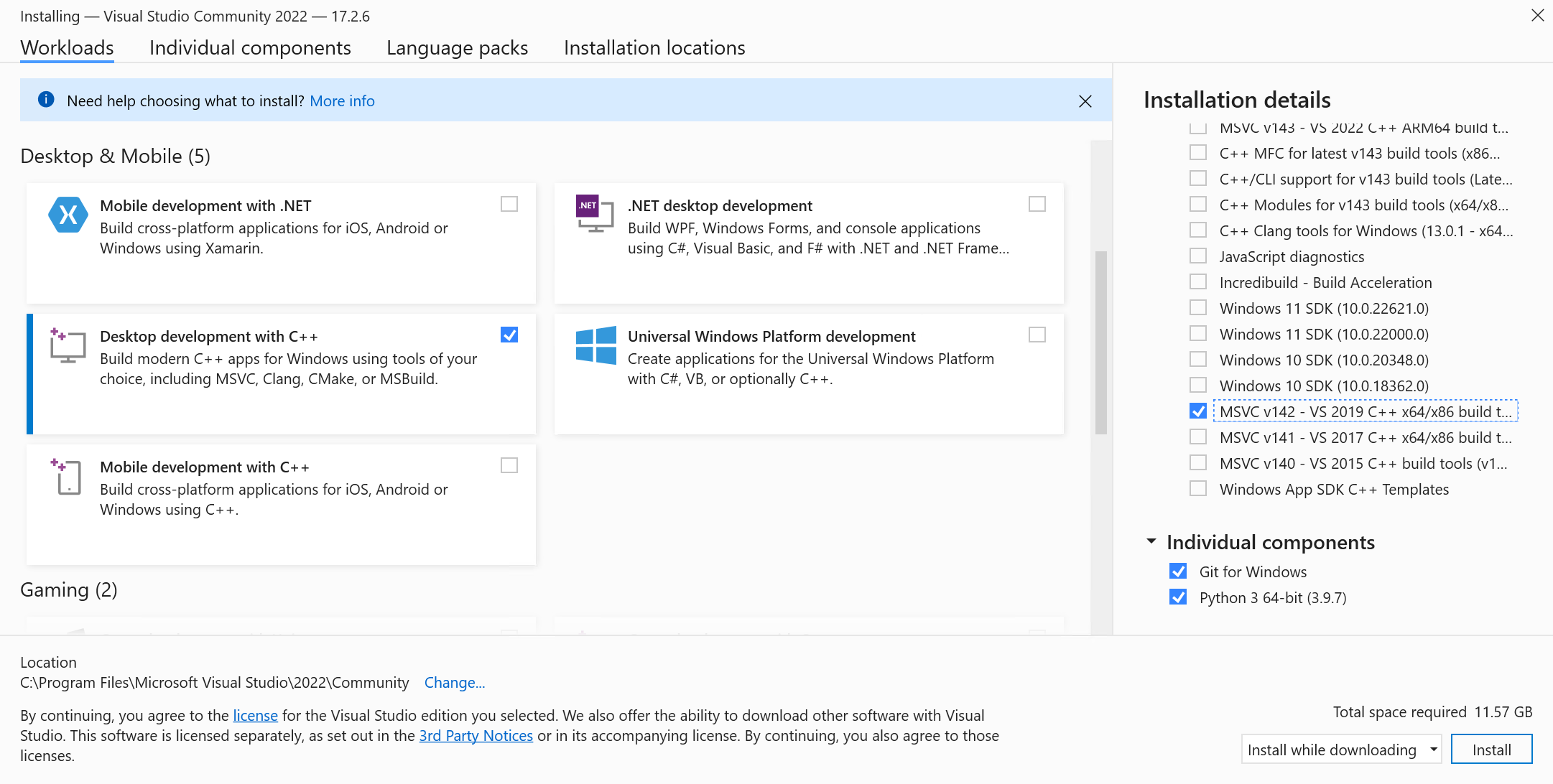
|
|
Doing so should also check one of the Windows SDKs by default. Then, in the installation details in the right-hand column, make sure you also check the v143 toolset. This is often done by default.
|
|
|
|
It is recommended that you install Python and Git standalone, the install process in VS Installer has given some issues in the past.
|
|
|
|
1. Clone the Ship of Harkinian repository
|
|
|
|
_Note: Be sure to either clone with the ``--recursive`` flag or do ``git submodule update --init`` after cloning to pull in the libultraship submodule!_
|
|
|
|
2. After setup and initial build, use the built-in OTR extraction to make your oot.o2r/oot-mq.o2r files.
|
|
|
|
_Note: Instructions assume using powershell_
|
|
```powershell
|
|
# Navigate to the Shipwright repo within powershell. ie: cd "C:\yourpath\Shipwright"
|
|
cd Shipwright
|
|
|
|
# Setup cmake project
|
|
# Add `-DCMAKE_BUILD_TYPE:STRING=Release` if you're packaging
|
|
# Add `-DSUPPRESS_WARNINGS=0` to prevent suppression of warnings from LUS and decomp (src) files. set to 1 to re-enable suppression
|
|
& 'C:\Program Files\CMake\bin\cmake' -S . -B "build/x64" -G "Visual Studio 17 2022" -T v143 -A x64
|
|
|
|
# Generate soh.o2r
|
|
& 'C:\Program Files\CMake\bin\cmake.exe' --build .\build\x64 --target GenerateSohOtr
|
|
|
|
# Compile project
|
|
# Add `--config Release` if you're packaging
|
|
& 'C:\Program Files\CMake\bin\cmake.exe' --build .\build\x64
|
|
|
|
# Now you can run the executable in .\build\x64 or run in Visual Studio
|
|
```
|
|
|
|
### Developing SoH
|
|
With the cmake build system you have two options for working on the project:
|
|
|
|
#### Visual Studio
|
|
To develop using Visual Studio you only need to use cmake to generate the solution file:
|
|
```powershell
|
|
# Generates Ship.sln at `build/x64` for Visual Studio 2022
|
|
& 'C:\Program Files\CMake\bin\cmake' -S . -B "build/x64" -G "Visual Studio 17 2022" -T v143 -A x64
|
|
```
|
|
|
|
#### Visual Studio Code or another editor
|
|
To develop using Visual Studio Code or another editor you only need to open the repository in it.
|
|
To build you'll need to follow the instructions from the building section.
|
|
|
|
_Note: If you're using Visual Studio Code, the [CMake Tools plugin](https://marketplace.visualstudio.com/items?itemName=ms-vscode.cmake-tools) makes it very easy to just press run and debug._
|
|
|
|
_Experimental: You can also use another build system entirely rather than MSVC like [Ninja](https://ninja-build.org/) for possibly better performance._
|
|
|
|
|
|
### Generating the distributable
|
|
After compiling the project you can generate the distributable by running:
|
|
```powershell
|
|
# Go to build folder
|
|
cd "build/x64"
|
|
# Generate
|
|
& 'C:\Program Files\CMake\bin\cpack.exe' -G ZIP
|
|
```
|
|
|
|
### Additional CMake Targets
|
|
#### Clean
|
|
```powershell
|
|
# If you need to clean the project you can run
|
|
C:\Program Files\CMake\bin\cmake.exe --build build-cmake --target clean
|
|
```
|
|
|
|
#### Regenerate Asset Headers
|
|
```powershell
|
|
# If you need to regenerate the asset headers to check them into source
|
|
C:\Program Files\CMake\bin\cmake.exe --build build-cmake --target ExtractAssetHeaders
|
|
```
|
|
|
|
## Linux
|
|
### Clone the repo and enter the directory
|
|
```sh
|
|
git clone https://github.com/HarbourMasters/Shipwright.git
|
|
cd Shipwright
|
|
```
|
|
### Install dependencies
|
|
|
|
> [!IMPORTANT]
|
|
> Minimum compiler versions:
|
|
> - GCC: see [`linux-build-deps/minimum-gcc-version.txt`](../linux-build-deps/minimum-gcc-version.txt)
|
|
> - Clang: see [`linux-build-deps/minimum-clang-version.txt`](../linux-build-deps/minimum-clang-version.txt)
|
|
|
|
#### Debian/Ubuntu
|
|
```sh
|
|
# using gcc
|
|
apt-get install gcc g++ $(cat linux-build-deps/apt.txt)
|
|
|
|
# or using clang
|
|
apt-get install clang $(cat linux-build-deps/apt.txt)
|
|
```
|
|
#### Arch
|
|
```sh
|
|
# using gcc
|
|
pacman -S gcc $(cat linux-build-deps/pacman.txt)
|
|
|
|
# or using clang
|
|
pacman -S clang $(cat linux-build-deps/pacman.txt)
|
|
```
|
|
#### Fedora
|
|
```sh
|
|
# using gcc
|
|
dnf install gcc gcc-c++ $(cat linux-build-deps/dnf.txt)
|
|
|
|
# or using clang
|
|
dnf install clang $(cat linux-build-deps/dnf.txt)
|
|
```
|
|
#### openSUSE
|
|
```sh
|
|
# using gcc
|
|
zypper in gcc gcc-c++ $(cat linux-build-deps/zypper.txt)
|
|
|
|
# or using clang
|
|
zypper in clang libstdc++-devel $(cat linux-build-deps/zypper.txt)
|
|
```
|
|
#### Nix
|
|
This repository provides a [`linux-build-deps/flake.nix`](../linux-build-deps/flake.nix) for setting up a development environment using [Nix](https://nixos.org/).
|
|
|
|
Run
|
|
|
|
```sh
|
|
nix develop ./linux-build-deps
|
|
```
|
|
|
|
from the repo root and you'll be dropped into a shell with all dependencies, ensuring that all build commands work.
|
|
|
|
### Verify cmake version
|
|
Older distros may ship a cmake older than this project requires. Compare:
|
|
```sh
|
|
cmake --version # your installed version
|
|
head -1 CMakeLists.txt # the project's required minimum
|
|
```
|
|
If your cmake is too old, you can install a newer version via:
|
|
- [pypi](https://pypi.org/project/cmake/)
|
|
- [kitware apt repo](https://apt.kitware.com/) (Ubuntu only)
|
|
- [Homebrew](https://formulae.brew.sh/formula/cmake)
|
|
|
|
### Build
|
|
|
|
_Note: If you're using Visual Studio Code, the [CMake Tools plugin](https://marketplace.visualstudio.com/items?itemName=ms-vscode.cmake-tools) makes it very easy to just press run and debug._
|
|
|
|
```bash
|
|
# Clone the submodules
|
|
git submodule update --init
|
|
|
|
# Generate Ninja project
|
|
# Add `-DCMAKE_BUILD_TYPE:STRING=Release` if you're packaging
|
|
# Add `-DSUPPRESS_WARNINGS=0` to prevent suppression of warnings from LUS and decomp (src) files. set to 1 to re-enable suppression
|
|
# Add `-DPython3_EXECUTABLE=$(which python3)` if you are using non-standard Python installations such as PyEnv
|
|
cmake -H. -Bbuild-cmake -GNinja
|
|
|
|
# Generate soh.o2r
|
|
cmake --build build-cmake --target GenerateSohOtr
|
|
|
|
# Compile the project
|
|
# Add `--config Release` if you're packaging
|
|
cmake --build build-cmake
|
|
|
|
# Now you can run the executable in ./build-cmake/soh/soh.elf
|
|
# To develop the project open the repository in VSCode (or your preferred editor)
|
|
```
|
|
|
|
> [!TIP]
|
|
> Some older distros ship packages without the cmake config files SoH's `find_package` calls need. If cmake fails with `Could not find a package configuration file provided by "<package>"`.
|
|
>
|
|
> Known failing package versions:
|
|
> - [tinyxml2](https://github.com/leethomason/tinyxml2) < 10.0.0
|
|
> - [SDL2_net](https://github.com/libsdl-org/SDL_net) < 2.2.0
|
|
>
|
|
> You can install a newer version of that package either
|
|
>
|
|
> by using [Homebrew](https://brew.sh/):
|
|
> ```sh
|
|
> brew install <package>
|
|
> ```
|
|
> When invoking cmake, add `-DCMAKE_PREFIX_PATH=$(brew --prefix)` so it knows to search brew's prefix for the installed package.
|
|
>
|
|
> ***OR***
|
|
>
|
|
> by building from source:
|
|
>
|
|
> Reference examples:
|
|
> - [`.github/actions/install-tinyxml2/action.yml`](../.github/actions/install-tinyxml2/action.yml)
|
|
> - [`.github/actions/install-sdl2-net/action.yml`](../.github/actions/install-sdl2-net/action.yml)
|
|
|
|
> [!TIP]
|
|
> There are known incompatibilities between some newer versions of `clang` and older versions of [`{fmt}`](https://github.com/fmtlib/fmt) (see https://github.com/fmtlib/fmt/issues/4807). If you see a `call to consteval function 'fmt::basic_format_string<...>' is not a constant expression` error, you can work around it by passing `-DCMAKE_CXX_FLAGS=-DFMT_CONSTEVAL=constexpr` to `cmake`.
|
|
|
|
### Generate a distributable
|
|
After compiling the project you can generate a distributable by running of the following:
|
|
```bash
|
|
# Go to build folder
|
|
cd build-cmake
|
|
# Generate
|
|
cpack -G DEB
|
|
cpack -G ZIP
|
|
cpack -G External (creates appimage)
|
|
```
|
|
|
|
### Additional CMake Targets
|
|
#### Clean
|
|
```bash
|
|
# If you need to clean the project you can run
|
|
cmake --build build-cmake --target clean
|
|
```
|
|
#### Regenerate Asset Headers
|
|
```bash
|
|
# If you need to regenerate the asset headers to check them into source
|
|
cmake --build build-cmake --target ExtractAssetHeaders
|
|
```
|
|
|
|
## macOS
|
|
Requires Xcode (or xcode-tools) && `sdl2, sdl2_net, libpng, glew, ninja, cmake, tinyxml2, nlohmann-json, libzip, opusfile, libvorbis` (can be installed via [homebrew](https://brew.sh/), macports, etc)
|
|
|
|
**Important: For maximum performance make sure you have ninja build tools installed!**
|
|
|
|
_Note: If you're using Visual Studio Code, the [CMake Tools plugin](https://marketplace.visualstudio.com/items?itemName=ms-vscode.cmake-tools) makes it very easy to just press run and debug._
|
|
|
|
```bash
|
|
# Clone the repo
|
|
git clone https://github.com/HarbourMasters/Shipwright.git
|
|
cd ShipWright
|
|
|
|
# Clone the submodule libultraship
|
|
git submodule update --init
|
|
|
|
# Install development dependencies (assuming homebrew)
|
|
brew install sdl2 sdl2_net libpng glew ninja cmake tinyxml2 nlohmann-json libzip opusfile libvorbis
|
|
|
|
# Generate Ninja project
|
|
# Add `-DCMAKE_BUILD_TYPE:STRING=Release` if you're packaging
|
|
# Add `-DSUPPRESS_WARNINGS=0` to prevent suppression of warnings from LUS and decomp (src) files. set to 1 to re-enable suppression
|
|
cmake -H. -Bbuild-cmake -GNinja
|
|
|
|
# Generate soh.o2r
|
|
cmake --build build-cmake --target GenerateSohOtr
|
|
|
|
# Compile the project
|
|
# Add `--config Release` if you're packaging
|
|
cmake --build build-cmake
|
|
|
|
# Now you can run the executable file:
|
|
./build-cmake/soh/soh-macos
|
|
# To develop the project open the repository in VSCode (or your preferred editor)
|
|
```
|
|
|
|
### Generating a distributable
|
|
After compiling the project you can generate a distributable by running of the following:
|
|
```bash
|
|
# Go to build folder
|
|
cd build-cmake
|
|
# Generate
|
|
cpack
|
|
```
|
|
|
|
### Additional CMake Targets
|
|
#### Clean
|
|
```bash
|
|
# If you need to clean the project you can run
|
|
cmake --build build-cmake --target clean
|
|
```
|
|
|
|
#### Regenerate Asset Headers
|
|
```bash
|
|
# If you need to regenerate the asset headers to check them into source
|
|
cmake --build build-cmake --target ExtractAssetHeaders
|
|
```
|
|
|
|
## Switch
|
|
1. Requires that your build machine is setup with the tools necessary for your platform above
|
|
2. Requires that you have the switch build tools installed
|
|
3. Clone the Ship of Harkinian repository
|
|
4. Place one or more [compatible](#compatible-roms) roms in the `OTRExporter` directory with namings of your choice
|
|
|
|
```bash
|
|
cd Shipwright
|
|
# Setup cmake project for your host machine
|
|
cmake -H. -Bbuild-cmake -GNinja
|
|
# Extract assets & generate OTR (run this anytime you need to regenerate OTR)
|
|
cmake --build build-cmake --target ExtractAssets
|
|
# Setup cmake project for building for Switch
|
|
cmake -H. -Bbuild-switch -GNinja -DCMAKE_TOOLCHAIN_FILE=/opt/devkitpro/cmake/Switch.cmake
|
|
# Build project and generate nro
|
|
cmake --build build-switch --target soh_nro
|
|
|
|
# Now you can run the executable in ./build-switch/soh/soh.nro
|
|
# To develop the project open the repository in VSCode (or your preferred editor)
|
|
```
|
|
|
|
## Wii U
|
|
1. Requires that your build machine is setup with the tools necessary for your platform above
|
|
2. Requires that you have the Wii U build tools installed
|
|
3. Clone the Ship of Harkinian repository
|
|
4. Place one or more [compatible](#compatible-roms) roms in the `OTRExporter` directory with namings of your choice
|
|
|
|
```bash
|
|
cd Shipwright
|
|
# Setup cmake project for your host machine
|
|
cmake -H. -Bbuild-cmake -GNinja
|
|
# Extract assets & generate OTR (run this anytime you need to regenerate OTR)
|
|
cmake --build build-cmake --target ExtractAssets
|
|
# Setup cmake project for building for Wii U
|
|
cmake -H. -Bbuild-wiiu -GNinja -DCMAKE_TOOLCHAIN_FILE=/opt/devkitpro/cmake/WiiU.cmake # -DCMAKE_BUILD_TYPE:STRING=Release (if you're packaging)
|
|
# Build project and generate rpx
|
|
cmake --build build-wiiu --target soh # --target soh_wuhb (for building .wuhb)
|
|
|
|
# Now you can run the executable in ./build-wiiu/soh/soh.rpx or the Wii U Homebrew Bundle in ./build-wiiu/soh/soh.wuhb
|
|
# To develop the project open the repository in VSCode (or your preferred editor)
|
|
```
|
|
|
|
# Compatible Roms
|
|
See [`supportedHashes.json`](supportedHashes.json)
|
|
|
|
## Getting CI to work on your fork
|
|
|
|
The CI works via [Github Actions](https://github.com/features/actions) where we mostly make use of machines hosted by Github; except for the very first step of the CI process called "Extract assets". This steps extracts assets from the game file and generates an "assets" folder in `soh/`.
|
|
|
|
To get this step working on your fork, you'll need to add a machine to your own repository as a self-hosted runner via "Settings > Actions > Runners" in your repository settings. Make sure to add the 'asset-builder' tag to your newly added runner to assign it to run this step. To setup your runner as a service read the docs [here](https://docs.github.com/en/actions/hosting-your-own-runners/configuring-the-self-hosted-runner-application-as-a-service?platform=linux).
|
|
|
|
### Runner on Windows
|
|
You'll have to enable the ability to run unsigned scripts through PowerShell. To do this, open Powershell as administrator and run `set-executionpolicy remotesigned`. Most dependencies get installed as part of the CI process. You will also need to separately install 7z and add it to the PATH so `7z` can be run as a command. [Chocolatey](https://chocolatey.org/) or other package managers can be used to install it easily.
|
|
|
|
### Runner on UNIX systems
|
|
If you're on macOS or Linux take a look at `.github/macports.yml` or `.github/workflows/apt-deps.txt` to see the dependencies expected to be on your machine.
|