Less than 100 instructions left to implement, with the vast vast
majority being load-and-stores. These will likely be knocked out quickly
but they require a more involved implementation than just simply
translating the instructions (several need multiple instructions, others
may need reserved registers (x16 or x17 are common for this purpose))

This is a good milestone to get something pushed to master.
Three changes:
1. Add lazy merging/replacing for texture `rgba_bytes`.
2. Use a single thread when decompiling with texture replacements.
3. Drop textures after serializing and before compression.

These changes should enable users to install **massive** texture packs
without issue.
Inside the build actor tool's dummy `merc-fragment`'s `merc-fp-data`,
the `shader-cnt` is set to `1`, which means that `login-adgifs` runs for
the fragment and attempts to login the texture. We don't need to do this
for custom actors and it can cause crashes during level unloading when
textures get unlinked, so we can just set the `shader-cnt` to `0` to
prevent this.
Adds support for exporting animations for foreground models. It's not
perfect and doesn't handle the Jak 2/3 animations very well in some
cases (scale can often get messed up, especially for the LZO compressed
ones, I have no idea what is going on with the data in those art groups
sometimes, so that'll have to be revisited later...), but it does a
decent job on Jak 1.

Additionally, the `build-actor` tool has also been changed to support
setting the `master-art-group-name` and `master-art-group-index` fields
to allow for custom art groups to link their animations to a different
master art group, which lets you add custom animations to vanilla art
groups.
This PR does the following:
- Designs a mechanism by which arm64 instructions can be encoded and
emitted
- Dispatch our higher-level instruction emitting calls to either x86 or
arm64 instructions depending on what the compiler is set to (defaults to
x86)
- Bare minimum scaffolding to get the arm64 instructions successfully
executing atleast on apple silicon
- Implement enough instructions to get the codetester test suite passing
on arm
### The Problem:
The tpages list at the top of the JSONC, never actually gets used or is
written into memory:
<img width="270" height="195" alt="1"
src="https://github.com/user-attachments/assets/d3983363-23db-496e-bcea-136ab0e04058"
/>
This means that previously, the only way that texture remapping was
working was in very specific circumstances, which is when the autofill
would trigger. The autofill would only trigger under these specific
conditions:
- Both a sky remap and level remap are used
- The sky remap and level remap are the same level
- The tpages list is empty

If you went against any of these three parameters, texture remapping
could not be done.
### The Solution:

I simply reversed the logging line
[here](https://github.com/open-goal/jak-project/blob/0fa93ce7b83d1621f3fd040625bfa865eadaeef0/goalc/build_level/jak1/build_level.cpp#L240),
which turns the tpages into numbers in order to print them, and reversed
the shift from << to >> to instead take the numbers and write them into
memory.

```cpp
if (!tpages.empty()) {
  file.texture_ids.resize(tpages.size());
  for (size_t i = 0; i < tpages.size(); ++i) {
    file.texture_ids[i] = tpages[i] << 20;
  }
}
```

Pictured: A sunken level remap (correct generic textures on water) with
a village1 sky (so not depending on the autofill that only runs when the
sky and level are matching):

<img width="1716" height="1012" alt="aaa"
src="https://github.com/user-attachments/assets/1af3eddb-a5fb-4387-b644-bf84ba60ab62"
/>
Resolves#3698
This is a known issue confirmed by HatKid after the release of the build
actor tool as something that came up during testing.
There is a problem which is you can't go over 255 vertices or faces in a
single collision primitive. The solution then is to split a single
object into two different primitives. This is what's done in the real
game.
The problem here is that the build actor tool also doesn't support
splitting an object into multiple objects in Blender. If you do, any
subsequent objects appear invisible. This is because the pipeline for
building materials is single-object. If you have a material on multiple
objects in Blender, only one gets built and any subsequent uses get
skipped as they were presumed to have already been built.
This simple fix adds an additional check to check both materials AND
objects when building materials.
This is a pretty important fix, as there's no way to get around the 255
hex limit, so at that point you have no choice but to separate objects
into two separate Blender objects. At this point, it doesn't make sense
to not be able to display the same material on multiple Blender objects.
This affects BOTH collision meshes as well as visual meshes.
This is also a particular issue for non-armature actors.
[Here](https://discord.com/channels/967812267351605298/989587365884485732/1310328952069296290)
is an example of others stumbling across this problem. The solution
found was to make sure all objects were in a single object.
Before this PR:
<video controls
src="https://github.com/user-attachments/assets/fabcd951-d855-4d52-8ed0-0aeea0b75414"></video>
After this PR:
<video controls
src="https://github.com/user-attachments/assets/3e3b7d53-e4ed-43bb-aef1-08cc147d44c0"></video>
After verifying so many things about the BVH trees being correct, I
noticed a pattern across missing collision: all missing collision was
always a face-containing child that was inside a node alongside another
non-face-containing parent.

This minimalist fix simply adds a wrapper so that when a face-containing
child exists alongside a non-face-containing parent, ie. `if (has_leaves
&& has_not_leaves)`, then it simply wraps the face-containing node in
another parent, so that face-containing spheres and non-face-containing
parents don't co-exist in the same node.

The result: restored collision for missing sections in custom levels.
Resolves#3075
TODO before merge:
- [x] Properly draw non-korean strings while in korean mode (language
selection)
- [x] Check jak 3
- [x] Translation scaffolding (allow korean characters, add to Crowdin,
fix japanese locale, etc)
- [x] Check translation of text lines
- [x] Check translation of subtitle lines
- [x] Cleanup PR / some performance optimization (it's take a bit too
long to build the text and it shouldn't since the information is in a
giant lookup table)
- [x] Wait until release is cut
I confirmed the font textures are identical between Jak 2 and Jak 3, so
thank god for that.
Some examples of converting the korean encoding to utf-8. These show off
all scenarios, pure korean / korean with ascii and japanese / korean
with replacements (flags):
<img width="316" height="611" alt="Screenshot 2025-07-26 191511"
src="https://github.com/user-attachments/assets/614383ba-8049-4bf4-937e-24ad3e605d41"
/>
<img width="254" height="220" alt="Screenshot 2025-07-26 191529"
src="https://github.com/user-attachments/assets/1f6e5a6c-8527-4f98-a988-925ec66e437d"
/>
And it working in game. `Input Options` is a custom not-yet-translated
string. It now shows up properly instead of a disgusting block of
glyphs, and all the original strings are hopefully the same
semantically!:
<img width="550" height="493" alt="Screenshot 2025-07-26 202838"
src="https://github.com/user-attachments/assets/9ebdf6c0-f5a3-4a30-84a1-e5840809a1a2"
/>
Quite the challenge. The crux of the problem is -- Naughty Dog came up
with their own encoding for representing korean syllable blocks, and
that source information is lost so it has to be reverse engineered.
Instead of trying to figure out their encoding from the text -- I went
at it from the angle of just "how do i draw every single korean
character using their glyph set".
One might think this is way too time consuming but it's important to
remember:
- Korean letters are designed to be composable from a relatively small
number of glyphs (more on this later)
- Someone at naughty dog did basically this exact process
- There is no other way! While there are loose patterns, there isn't an
overarching rhyme or reason, they just picked the right glyph for the
writing context (more on this later). And there are even situations
where there IS NO good looking glyph, or the one ND chose looks awful
and unreadable (we could technically fix this by adjusting the
positioning of the glyphs but....no more)!
Information on their encoding that gets passed to `convert-korean-text`:
- It's a raw stream of bytes
- It can contain normal font letters
- Every syllable block begins with: `0x04 <num_glyphs> <...the glyph
bytes...>`
- DO NOT confuse `num_glyphs` with num jamo, because some glyphs can
have multiple jamo!
- Every section of normal text starts with `0x03`. For example a space
would be `0x03 0x20`
- There are a very select few number of jamo glyphs on a secondary
texture page, these glyph bytes are preceeded with a `0x05`. These jamo
are a variant of some of the final vowels, moving them as low down as
possible.
Crash course on korean writing:
- Nice resource as this is basically what we are doing -
https://glyphsapp.com/learn/creating-a-hangeul-font
- Korean syllable blocks have either 2 or 3 jamo. Jamo are basically
letters and are the individual pieces that make up the syllable blocks.
- The jamo are split up into "initial", "medial" and "final" categories.
Within the "medial" category there are obvious visual variants:
- Horizontal
- Vertical
- Combination (horizontal + a vertical)
- These jamo are laid out in 6 main pre-defined "orientations":
- initial + vertical medial
- initial + horizontal medial
- initial + combination
- initial + vertical medial + final
- initial + horizontal medial + final
- initial + combination + final
- Sometimes, for stylistic reasons, jamo will be written in different
ways (ie. if there is nothing below a vertical vowel will be extended).
- Annoying, and ND's glyph set supports this stylistic choice!
- There are some combination of jamo that are never used, and some that
are only used for a single word in the entire language!
With all that in mind, my basic process was:
- Scan the game's entire corpus of korean text, that includes subtitles.
It's very easy to look at the font texture's glyphs and assign them to
their respective jamo
- This let me construct a mapping and see which glyphs were used under
which context
- I then shoved this information into a 2-D matrix in excel, and created
an in-game tool to check every single jamo permutation to fill in the
gaps / change them if naughty dogs was bad. Most of the time, ND's
encoding was fine.
-
https://docs.google.com/spreadsheets/d/e/2PACX-1vTtyMeb5-mL5rXseS9YllVj32BGCISOGZFic6nkRV5Er5aLZ9CLq1Hj_rTY7pRCn-wrQDH1rvTqUHwB/pubhtml?gid=886895534&single=true
anything in red is an addition / modification on my part.
- This was the most lengthy part but not as long as you may think, you
can do a lot of pruning. For example if you are checking a 3-jamo
variant (the ones with the most permutations) and you've verified that
the medial jamo is as far up vertically as it can be, and you are using
the lowest final jamo that are available -- there is nothing to check or
improve -- for better or worse! So those end up being the permutations
between the initial and medial instead of a three-way permutation
nightmare.
- Also, while it is a 2d matrix, there's a lot of pruning even within
that. For example, for the first 3 orientations, you dont have to care
about final vowels at all.
- At the end, I'm left with a lookup table that I can use the encode the
best looking korean syllable blocks possible given the context of the
jamo combination.
If long_name is too long, it will result in the level being invisible
but the collide loading, lets detect this and point the user in correct
direction to solve it with a clear error message.

---------

Co-authored-by: Hat Kid <6624576+Hat-Kid@users.noreply.github.com>
I discovered that `yakow`s are kinda broken if you try to use them in
custom levels in jak 2/3.

It's due to the missing `yakow-lod0` texture and associated fix,
replacing it with `yak-medfur-end`. This solution works fine for the
decompiler on vanilla levels.

But for building custom levels, the requested art-groups were being
handled before the textures were, and so it was impossible to have
`yak-medfur-end` on hand to do the replacement. You'd hit an exception
here because `idx_in_level_texture` would still be `INT32_MAX`:

https://github.com/open-goal/jak-project/blob/c08118509b84feba002bd9e208f49162b4218556/decompiler/level_extractor/extract_merc.cpp#L806

My fix was just to swap the order when building custom levels, and
handle the textures first. I only made the changes for jak2/3, because I
see @Hat-Kid has a slightly different implementation for jak1.

There's one other small change relating to the `combo_id` /
`pc_combo_tex_id` short-circtuiting - I think `pc_combo_tex_id` is
always 0 for vanilla textures? So initially `yakow-lod0` actually ended
up matching the `combo_id` of the checkerboard texture from the
test-zone GLB. I just added another sanity check here that the texture
names match too.

(I also added yakows in the test-zone.jsonc files 🐄)
Follow-up later on improving the validation of the extractor (that may
require testing with all iso versions), but this is just some simple
safe-guarding code that will improve the error messaging, instead of
just a vague invalid map error.

Because merc effects for custom models would always have the
`envmap-usage` flag set, this would also set the `ignore-alpha` flag,
making transparency effects not work. Now the envmap flag is only set
when the effect actually has an envmap.
Custom levels for Jak 2/3 now support envmapped TIE geometry. The TIE
extract was also changed to ignore materials that have the specular flag
set, but are missing a roughness texture.

Jak 2/3 now also support the `build-actor` tool.

The `build-custom-level` and `build-actor` macros now have a few new
options:

- Both now have a `force-run` option (`#f` by default) that, when set to
`#t`, will always run level/art group generation even if the output
files are up to date.
- `build-custom-level` has a `gen-fr3` option (`#t` by default) that,
when set to `#f`, will skip generating the FR3 file for the custom level
and only generate the GOAL level file to skip the potentially slow
process of finding and adding art groups and textures. Useful for when
you want to temporarily edit only the GOAL side of the level (such as
entity placement, etc.).
- `build-actor` has a `texture-bucket` option (default 0) which will
determine what DMA sink group the model will be placed in, which is
useful to determine the draw order of the model. Previously, this was
omitted, resulting in shadows not drawing over custom actors because the
actors were put in a bucket that is drawn after shadows (this behavior
can be restored with `:texture-bucket #f`).
Migrates all code, there should be no change in the compilation output
(linter should check this)

At first i was considering making these builtins, which short of a bunch
of code generation, would require some sort of dynamic definition in
`Atoms.cpp`. This isn't hard but, i figured it would be better to keep
it simple and just generate the OG macros.

Fixes https://github.com/open-goal/jak-project/issues/233
Fix a missing scale factor when using the large mode in the animation
compressor. This would make some joints have a translation of near 0 if
the original animation had stuff moving a large distance

Co-authored-by: water111 <awaterford1111445@gmail.com>
Two new flags were added to the Blender plugin to allow reusing the mod
and/or eye draws of the original model that is being replaced. Works
pretty well for eyes, but the blerc draws can cause some Z-fighting with
the non-moving parts of the model.

Also a small refactor to the merc replacement code to de-duplicate some
code by moving stuff to `gltf_util.cpp`.
A few improvements to color palette selection. These were made by
tracing some particularly bad colors through and seeing where it made
obviously bad decisions for splitting. I tested on crystal cave, and a
test GLBs from Kuitar that previously had issues with alpha.

- The previous approach to splitting was based on trying to keep a tree
of deduplicated colors balanced (same count in each leaf). This is not
really a good idea for generating color palettes. A better approach is
to try to minimize the volume of the child node, limiting how inaccurate
a color can be. Splitting is now chosen based on the average of the
_deduplicated channel values_, which in practice seems to work pretty
well for Kuitar's levels. Other approaches could work here too.
- The previous approach of alternating through dimensions to split on
was kept.
- The depth of the KD tree during the initial split was increased,
allowing it to use up to 8192 colors, instead of just 1024.
- In most cases, not all child nodes of the tree have colors in them,
meaning that a tree of depth 13 would have less than 8192 colors. If
this happens, child nodes are split until the color count reaches 8192.
The selection of which nodes to split is somewhat arbitrary, but is
breadth-first. The axis for splitting is the one with the largest range.
(which might be a better idea in general?)

On crystal-cave, the worst case color error was reduced from 221 to 9.

---------

Co-authored-by: water111 <awaterford1111445@gmail.com>
Fixes the issue with animations doing a full 180 degree rotation and
disappearing. The quaternions in the GLB export "flip", and when
interpolating animation frames in between a flip, we got bogus
quaternions.

Fixes https://github.com/open-goal/jak-project/issues/3786

Also fix a crash in `goalc` when using merc models without any
materials.

Co-authored-by: water111 <awaterford1111445@gmail.com>
Store a small database of which models have already been swapped out in
a level to prevent duplicate processing.

Also a small fix for cases where using a model replacement that has no
armature would cause merc nightmares due to only having a `max_bones` of
3.
When a material in Blender has its IOR level changed to anything other
than the default value of 0.5, the `KHR_materials_specular` extension is
applied during the glTF export, which is what we use to check for
envmaps in custom models. If an envmap is undesired, but the IOR value
was accidentally changed, the program would assert during model
processing if there is no metallic roughness texture attached to the
material.

Since this is an easy mistake to make and is hard to spot, this adds a
better error message for such cases.
Base implementation of the popup menu and speedrunner mode in Jak 3.
Autosplitter is untested because I'm on Linux.

Also a couple of other misc changes:

- Model replacements can now have custom bone weights. Needs the "Use
Custom Bone Weights" property (provided by the OpenGOAL Blender plugin)
enabled in Blender.
- Better error message for lump syntax errors in custom level JSON
files.
By adding the `draco` library as a dependency, `tinygltf` can support
GLB files compressed with the Draco compression algorithm which allows
for drastically reduced file sizes for custom levels (TFL's Crescent Top
GLB for example went from 135 MB to 37 MB).
- Bug fix to KD tree splitting, should fix cases with bad vertex
colors/alphas.
- Normalize normals instead of asserting if they are the wrong length.
**the fact that blender exports normals incorrectly is a bug and I doubt
their implementation is correct if you've scaled things on only on
axis.**
- Automatically resize metallic texture (envmap strength) if it doesn't
match the size of the rgb texture instead of asserting

Co-authored-by: water111 <awaterford1111445@gmail.com>
I hope this is everything I needed, and nothing I didn't.

## What's Changed

This update adds a command-line parameter to goalc, `--iso-path`.
Providing a path to a directory like
`D:\Files\Repositories\ArchipelaGOAL\iso_data\jak1` will inform the
compiler to use that directory instead.

## Why is this useful?

When combined with `--proj-path`, the compiler can be pointed to a
completely different project folder, given the `(mi)` command, and
immediately begin building from that directory, with everything it
needs. This eliminates the need to copy `iso_data` to multiple `data`
directories.

If a subsequent change to the Launcher is made, each mod could be passed
an --iso-path pointing to a single shared folder, allowing mods to each
run their own REPL _without_ requiring a copy of `iso_data` in a
subfolder.

## Independent testing required!

My local repositories are a little suspect, with a mod, a fork of
mod-base, and a fork of jak-project, all on the same drive. My
decompiler_out and iso_data folders are in the mod repo, not mod-base
nor jak-project. So what I did was make the change in the mod-base fork,
point `--proj-path and --iso-path` to the mod folders, and then ran
`(mi)`. The output showed a build starting with no errors.

Then I had to create this PR, which my fork of mod-base is unable to do,
so I created a patch file, forked jak-project, then applied the patch
there.

All this is to say that it would be preferable if someone could apply
this code to their own installation and see if it works. Even I wouldn't
take my own word for this.

---------

Co-authored-by: Tyler Wilding <xtvaser@gmail.com>
This adds some new JSON entries to custom levels so they can support
vanilla sky textures and the texture remapping tables, allowing for
proper textures on objects that use `generic`, like dark eco pools or
dying enemies.

The comments explain it in more detail, but the gist is:

For skies:
- `sky` needs to be a vanilla level that has sky textures.
- The alpha tpage (fourth entry in `tpages`) needs to be that vanilla
level's alpha tpage (if `tex_remap` is the same level as `sky`, this
will be handled automatically).
- The tpage needs to be added to the custom level `.gd` and to
`textures` in the JSON.
- In `level-info.gc`, `sky` needs to be `#t`, your level's mood needs to
call `update-mood-sky-texture` (the default mood, `update-mood-default`,
handles this as an example) and `sun-fade` needs to be nonzero for the
sun to show up.

For `generic` textures:
- `tex_remap` needs to be the name of a vanilla level.
- When using a vanilla level's remap table, you need to adhere to the
order of the files in that level's `.gd` in your own level.
  - Code files are first.
- Then the tpages (in the order `tfrag`, `pris`, `shrub`, `alpha`,
`water`).
  - Then the art groups.
  - Lastly, the level file.
- The tpages need to be added to the `textures` in the JSON.
This only applies to the background for now:

- support for alpha for vertex colors in custom levels
- switch time of day palette generation from octree to k-d tree
- support for alpha masking in custom levels
- support for transparent textures
- support for envmap in custom levels

---------

Co-authored-by: water111 <awaterford1111445@gmail.com>
This adds a feature to `build_actor` to support importing skeletons and
animations from .glb files.

Multiple animations are handled and will use the name in the GLB. The
default `viewer` process will end up playing back the first animation.

There are a few limitations:
- You can only have around 100 bones. It is technically possibly to have
slightly more, but certain animations may fail to compress when there
are more than ~100 bones.
- Currently, all animations have 60 keyframes per second. This is a
higher quality than what is normally used. If animation size becomes
problematic, we could make this customizable somehow.
- There is no support for the `align` bone.

---------

Co-authored-by: water111 <awaterford1111445@gmail.com>
This adds support for replacing existing merc models in FR3 files with
custom GLB model files. The replacements go in
`custom_assets/<GAME>/merc_replacements`, similar to texture
replacements. When a `.glb` file with a file name that matches any model
present in an FR3 is detected (e.g. `eichar-lod0` for Jak), all merc
model data is replaced with the given model.

Additionally, models for custom actors can now also be added to vanilla
FR3s. The models for this go in
`custom_assets/<GAME>/models/<LEVEL_NAME>` (e.g.
`custom_assets/jak1/models/jungleb/test-actor-lod0.glb`) and will be
added to the FR3 that has a matching name (exception: to add things to
the common level file, the folder should be named `common` instead of
`GAME`).
For custom levels, these now go in
`custom_assets/<GAME>/models/custom_levels` (previously
`custom_assets/<GAME>/models`).

Another small change: When level ripping is enabled, the resulting model
files will now be stored in game name subfolders inside of `glb_out`.
This adds support for generating collide meshes when importing custom
models. A couple of things to keep in mind:

- A single `collide-mesh` may only have up to 255 vertices.
- When exporting a GLTF file in Blender, a `collide-mesh` will be
generated for every mesh object that has collision properties applied
(ideally, you would set all visual meshes to `ignore` and your collision
meshes to `invisible` in the OpenGOAL plugin's custom properties).
- Ensure that your actor using the model properly allocates enough
`collide-shape-prim-mesh`es for each `collide-mesh` ([example from the
original game that uses multiple
meshes](https://github.com/open-goal/jak-project/blob/f6688659f2ef85f5ceaacea6271580c9f4d91ed1/goal_src/jak1/levels/finalboss/robotboss.gc#L2628-L2806)).

~One annoying problem that I haven't fully figured out yet (unrelated to
the actual functionality):
`collide-mesh`es are stored in art groups as an `(array collide-mesh)`
in the `art-joint-geo`'s `extra`, so I had to add a new `Res` type to
support this. The way that `array`s are stored in `res-lump`s is a bit
of a hack right now. The lump only stores a pointer to the array, so the
size of that is 4 bytes, but because we have to generate all the actual
array data too, the current `ResLump` code in C++ doesn't handle this
case well and would assert, so I decided to omit the asserts if an
`array` tag is present and "fake" the size so the object file is
generated more closely to how the game expects it until we figure out
something better.~
This was fixed by generating the array data beforehand and creating a
`ResRef` class that takes the pointer to the array data and adds it to
the lump.
This does a couple of things:

- The `custom_levels` folder was renamed to `custom_assets` and contains
`levels`, `models` and `texture_replacements` folders for Jak 1, 2 and 3
in order to keep everything regarding custom stuff in one place.
- With this, texture replacements now use separate folders for all games
- A build actor tool was added that generates art groups for custom
actors
- Custom levels can now specify what custom models from the `models`
folder they want to import, this will add them to the level's FR3.
- A `test-zone-obs.gc` file was added, containing a `test-actor` process
that uses a custom model as an example.

The build actor tool is still very WIP, the joints and the default
animation are hardcoded, but it allows for importing any GLB file as a
merc model.
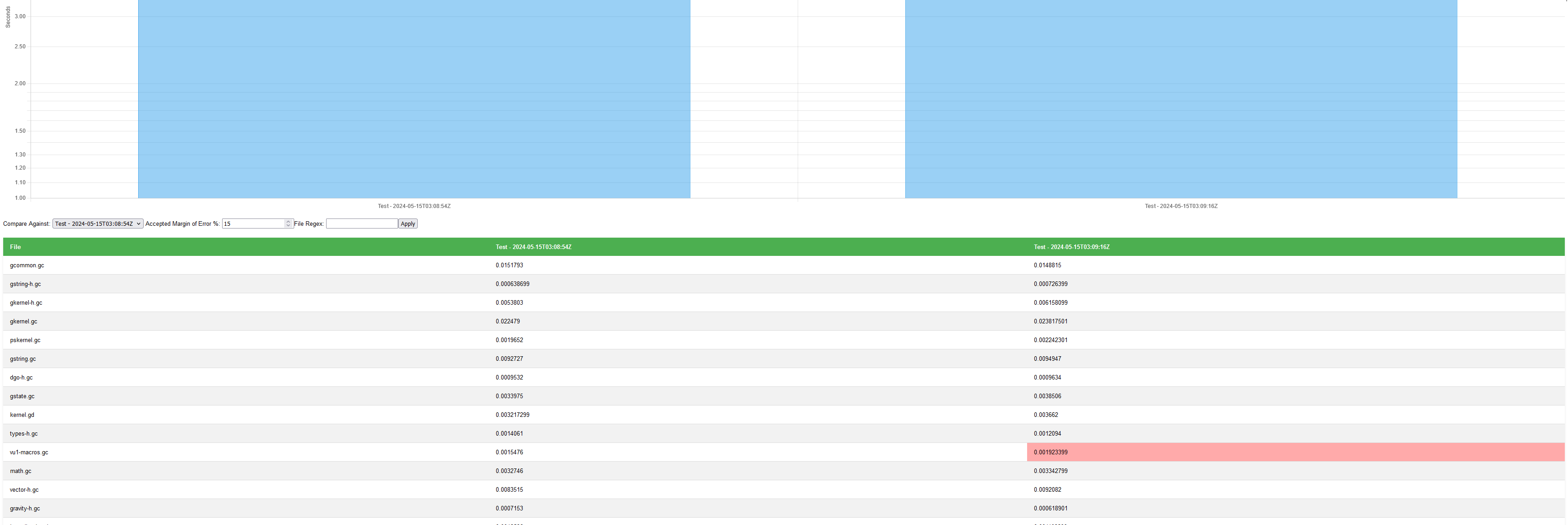
Adds a quick perf report feature to `goalc` that lets you compare how
much faster / slower it takes to compile the projects, with some simple
features like filtering the files, adjusting for how large of a margin
of error in the speeds you care about, and which test iteration you want
to compare against.
This is something I plan to use as I work more in `goalc` as an easy way
to track / show the results.
Relates to #1353

This adds no new functionality or overhead to the compiler, yet. This is
the preliminary work that has:
- added code to the compiler in several spots to flag when something is
used without being properly required/imported/whatever (disabled by
default)
- that was used to generate project wide file dependencies (some
circulars were manually fixed)
- then that graph underwent a transitive reduction and the result was
written to all `jak1` source files.

The next step will be making this actually produce and use a dependency
graph. Some of the reasons why I'm working on this:
- eliminates more `game.gp` boilerplate. This includes the `.gd` files
to some extent (`*-ag` files and `tpage` files will still need to be
handled) this is the point of the new `bundles` form. This should make
it even easier to add a new file into the source tree.
- a build order that is actually informed from something real and
compiler warnings that tell you when you are using something that won't
be available at build time.
- narrows the search space for doing LSP actions -- like searching for
references. Since it would be way too much work to store in the compiler
every location where every symbol/function/etc is used, I have to do
ad-hoc searches. By having a dependency graph i can significantly reduce
that search space.
- opens the doors for common shared code with a legitimate pattern.
Right now jak 2 shares code from the jak 1 folder. This is basically a
hack -- but by having an explicit require syntax, it would be possible
to reference arbitrary file paths, such as a `common` folder.

Some stats:
- Jak 1 has about 2500 edges between files, including transitives
- With transitives reduced at the source code level, each file seems to
have a modest amount of explicit requirements.

Known issues:
- Tracking the location for where `defmacro`s and virtual state
definitions were defined (and therefore the file) is still problematic.
Because those forms are in a macro environment, the reader does not
track them. I'm wondering if a workaround could be to search the
reader's text_db by not just the `goos::Object` but by the text
position. But for the purposes of finishing this work, I just statically
analyzed and searched the code with throwaway python code.
This adds hfrag, but with a few remaining issues:
- The textures aren't animated. Instead, it just uses one texture.
- The texture filtering isn't as good as at it could be.

I also cleaned up a few issues with the background renderers:
- Cleaned up some stuff that is common to hfrag, tie, tfrag, shrub
- Moved time-of-day color packing stuff to FR3 creation, rather than at
level load. This appears to reduce the frame time spikes when a level is
first drawn by about 5 or 6 ms in big levels.
- Cleaned up the x86 specific stuff used in time of day. Now there's
only one place where we have an `ifdef`, rather than spreading it all
over the rendering code.
 Tyler Wilding