This is a simple multiplier to the gamepad axis input value received
from SDL events. Normally the values it provides cannot satisfy the
square range of the stick input. This is usually fine but it might play
differently with different controllers and compared to consoles,
especially considering the DualShock 1/2 have automatic calibration
which works in mysterious ways. The setting is there so any user can
adjust it for their controllers.

Saved to and loaded from the input-settings.json file.

133% matches PCSX2's default setting and is generally a good value to
map the square stick range within most modern(ish) controllers' circular
stick motion.

Progress menu option added to Jak 1 and 2. Setting can be changed from
50% all the way to 200%.

~~Renamed the analog deadzone options to stick deadzone since they don't
apply to the other analog buttons and only the (analog, yes) sticks.~~
This PR updates to SDL3, and with it, adds a handful of new features.
Everything seems to work but I'm going to look over the code once last
time before merging, some of the API changes are hard to spot.
Fixes#2773
### Pressure sensitivity support for DS3 Controllers
SDL3 adds pressure sensitivity support for DS3 controllers on windows. I
have not tested on linux. The option is disabled by default.
On windows you will need https://docs.nefarius.at/projects/DsHidMini/
and to be using SXS mode.
### DualSense and Xbox One Trigger Effects
If enabled, Jak 2 will have certain trigger effects. They are:
- xbox1:
- small vibrate when collecting dark eco
- big vibrate when changing to dark jak
- vibrate when shooting gun, proportional to gun type
- ps5:
- resistance when changing to dark jak
- different gun shooting effects
- red (resistance)
- yellow (weapon trigger)
- blue (vibrates)
- purple (less resistance)
> **Gun Shooting effects are only enabled if the new "Swap R1 and R2"
option is enabled**
There are more effects that could be used in `dualsense_effects.cpp`,
but I only exposed the ones I needed to OpenGOAL. If a modder wants to
use some of the others and wires them up end-to-end, please consider
contributing that upstream.
### New ImGUI Menu
Added new imgui options for selecting the active controller, for those
people that struggle to select the initial controller.

### Testing
The highlights of what I tested successfully:
- display
- [x] all mode switch permutations
- [x] launch with all modes saved
- [x] switch monitors / unplug monitor that was active, how does it
handle it
- [x] load with alternate monitor saved and all modes
- [x] allowing hidpi doesnt break macos
- controls
- [x] keyboard and mouse still work
- [x] pressure sensitivity on linux
After the change to vector ops, subrails was crashing. This fixes the
crash by fixing a stack type and also marks those new vector op
functions as inline.

Co-authored-by: water111 <awaterford1111445@gmail.com>
This adds more recognition for inlined vector functions to the
decompiler, which can clean up a bunch of ugly looking code/`rlet`s.

Unfortunately, this changes the numbering of ops in the decomp, since
all the vector instructions get combined in a single "operation" by the
decompiler. I really tried to avoid having this ever happen in the
decompiler and this is one of the few cases where it has. So I had to
update a bunch of type casts.
For that reason I haven't turned this on in Jak 2 yet, although I am
planning to do that at some point. (probably at the same time as porting
back a bunch of jak 3 improvements to jak 2)
---------
Co-authored-by: water111 <awaterford1111445@gmail.com>
This PR does a few cleanups:
- improve method names/comments/flags for `enemy.gc` and a few other
files
- fix `new-stack-matrix0` not working for jak 3
- add `matrix-copy!` detection for jak 3
- add `vector-copy!` detection

---------

Co-authored-by: water111 <awaterford1111445@gmail.com>
It looks like one of the tie models in this level has bad color data in
the lowest LOD. For now, just skip extracting the lowest lod for this
TIE only.

Co-authored-by: water111 <awaterford1111445@gmail.com>
This adds some new JSON entries to custom levels so they can support
vanilla sky textures and the texture remapping tables, allowing for
proper textures on objects that use `generic`, like dark eco pools or
dying enemies.

The comments explain it in more detail, but the gist is:

For skies:
- `sky` needs to be a vanilla level that has sky textures.
- The alpha tpage (fourth entry in `tpages`) needs to be that vanilla
level's alpha tpage (if `tex_remap` is the same level as `sky`, this
will be handled automatically).
- The tpage needs to be added to the custom level `.gd` and to
`textures` in the JSON.
- In `level-info.gc`, `sky` needs to be `#t`, your level's mood needs to
call `update-mood-sky-texture` (the default mood, `update-mood-default`,
handles this as an example) and `sun-fade` needs to be nonzero for the
sun to show up.

For `generic` textures:
- `tex_remap` needs to be the name of a vanilla level.
- When using a vanilla level's remap table, you need to adhere to the
order of the files in that level's `.gd` in your own level.
  - Code files are first.
- Then the tpages (in the order `tfrag`, `pris`, `shrub`, `alpha`,
`water`).
  - Then the art groups.
  - Lastly, the level file.
- The tpages need to be added to the `textures` in the JSON.
- Fix global heap display in cheat mode
- Fix `tpl-watcher` NaNs after they fire their laser (`vf0` was being
clobbered) (Fixes#3684)
- Fix `artifact-race` talkers (Fixes#3685)
`bigmap` and `blit-displays` mostly work. `blit-displays` is still
missing all of the special effects that were added in Jak 3 (brightness
and contrast settings, screen blur effect, etc.).
`bigmap` is missing the player marker texture (`hud-target-marker`) for
some reason, it's part of `tpage-17` which is coming from
`progress-minimap` and should already be included. The icons also
currently stretch when using aspect ratios other than 4:3.
The progress menu now also works for the most part. The draw order is a
bit messed up because some code was initially drawing things with the
ocean bucket, which was changed to use `hud-draw-hud-alpha` instead for
now. The texture for the volume and brightness/contrast sliders still
looks wrong.
Fixes#3653Fixes#3656
Found out the hard way that the `abutton` array for pressure sensitivity
uses a different order than the `pad-buttons` enum, so I created a new
enum for abutton indexing.

I replaced any magic numbers across the codebase where it made sense,
e.g.
`(-> *cpad-list* cpads (-> self control unknown-cpad-info00 number)
abutton 6)`
becomes
`(-> *cpad-list* cpads (-> self control unknown-cpad-info00 number)
abutton (abutton-idx x))`
Finnish translations for Jak 2. These include cutscenes and all game
text.
All subtitle timings for cutscenes as well as non-cutscenes have been
edited for a better flow and to fit the 4x3 ratio.
I've been working on these solo for the most part so any input from
other finns would be appreciated.
A few issues in the progress menu I mentioned in #3504 still persist
I couldn't figure out how to add Finnish to the options menu, so I'm
gonna need someone else to do that part. 💀
But I was able to add them to the debug menu.
I also increased subtitle heap so hopefully that doesn't break anything.
Fixes#3620
---------
Co-authored-by: Tyler Wilding <xtvaser@gmail.com>
They still don't work yet, this is just naming/comments to help with
debug.

The vehicle tracks are now at least trying to draw, but like the others,
don't actually show up.
This attempts to do a best-effort quick fix for the sprite alignment in
the menus and first person views on higher aspect ratios. This:
- Hides the binocular borders completely when using a non-standard ratio

- Hides the borders in jak's first person view when using a non-standard
ratio

- Uses a combination of manual alignment and approximation to get the
pause menu closer.

> 32:9 screenshot.
I accomplished the last one by manually aligning all of the core sprites
and text for the most popular aspect ratios. This means that from a
practical standpoint, things should align "perfectly". However, I then
used all of those values to derive a polynomial for each adjustment
based on the aspect ratio. This allows the game to do a half-decent
approximation/interpolation for every aspect ratio in-between the common
ones. It won't be perfect, but it will be better than this:

This centralizes the code that both `extractor` and the decompiler
executes. In the past this code was partially-duplicated, meaning that
the `extractor` could only do _some_ operations and not others (ie.
could not extract the audio files).
I also simplified the process to enable audio streaming in the
configuration. This is to support a new feature in the launcher that
allows you to enable these options for the decompiler:

This PR does two main things:
1. Work through the main low-hanging fruit issues in the formatter
keeping it from feeling mature and usable
2. Iterate and prove that point by formatting all of the Jak 1 code
base. **This has removed around 100K lines in total.**
- The decompiler will now format it's results for jak 1 to keep things
from drifting back to where they were. This is controlled by a new
config flag `format_code`.
How am I confident this hasn't broken anything?:
- I compiled the entire project and stored it's `out/jak1/obj` files
separately
- I then recompiled the project after formatting and wrote a script that
md5's each file and compares it (`compare-compilation-outputs.py`
- The results (eventually) were the same:

> This proves that the only difference before and after is non-critical
whitespace for all code/macros that is actually in use.
I'm still aware of improvements that could be made to the formatter, as
well as general optimization of it's performance. But in general these
are for rare or non-critical situations in my opinion and I'll work
through them before doing Jak 2. The vast majority looks great and is
working properly at this point. Those known issues are the following if
you are curious:

For now, this just adds sky (clouds and fog), darkjak, and skull gem.

There are some unknown issues with drawing the skull gems still, but I
think it's unrelated to texture animations.

Also fixes https://github.com/open-goal/jak-project/issues/3523
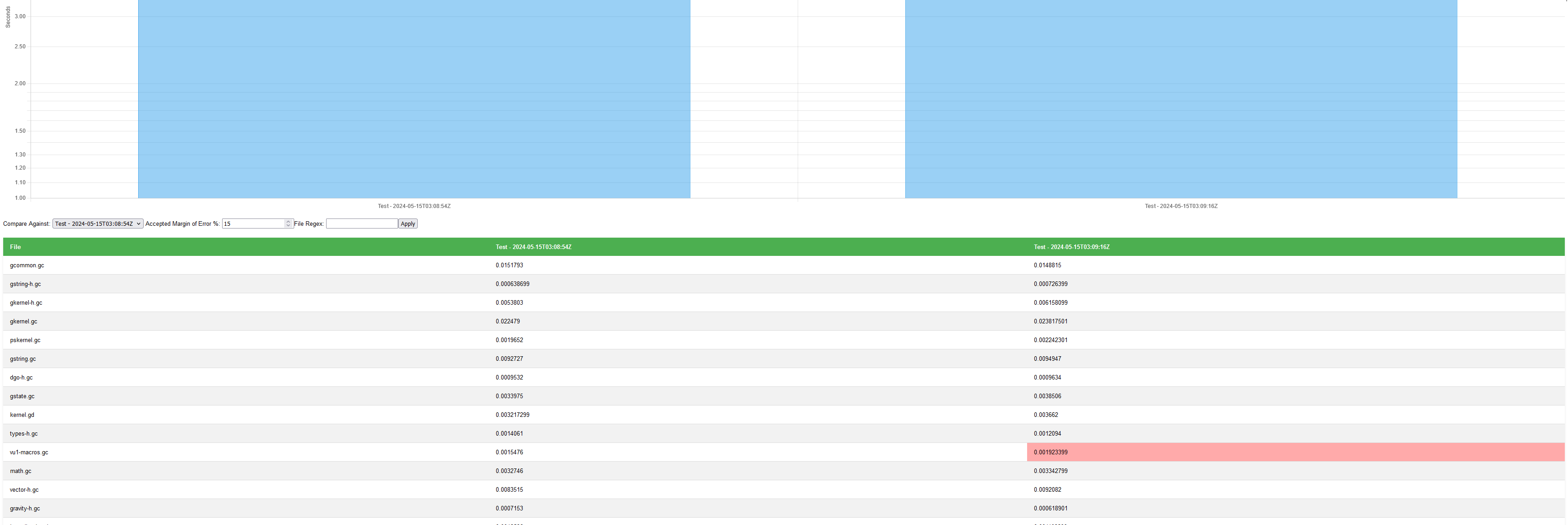
Adds a quick perf report feature to `goalc` that lets you compare how
much faster / slower it takes to compile the projects, with some simple
features like filtering the files, adjusting for how large of a margin
of error in the speeds you care about, and which test iteration you want
to compare against.
This is something I plan to use as I work more in `goalc` as an easy way
to track / show the results.
 Alex
Alex